Integrations
Workato
Overview
With this connector, you can unify your communication strategy, accelerate execution, and deliver exceptional customer experiences—all while keeping your email operations flexible, scalable, and fully automated.
- Streamline Operations: Automate emails triggered by critical events in CRMs, support tools, or databases.
- Enhance Deliverability & Engagement: Rely on Mailgun’s enterprise-grade infrastructure to deliver messages securely, at scale, and with real-time insights into engagement (opens, clicks, bounces)
- Reduce Manual Effort: Eliminate repetitive tasks and hand-offs by orchestrating end-to-end email workflows that connect your applications, data, and teams.
- Simplify Complexity: Empower business and operations teams to automate communication without writing code, while maintaining the observability and reliability IT leaders expect.
Key Features
Automate email communication around critical events like:
- Sending transactional or marketing emails directly from workflows triggered by events in CRMs, support tools, or databases.
- Triggering unsubscribe events with automated follow-up emails, helping you confirm opt-outs and provide preference center links.
- Triggering failed email delivery alerts, followed by retry workflows or email to internal teams to address issues quickly.
- Combining email with SMS in a single workflow — for example, sending an SMS follow-up when a critical email bounces or goes unopened.
- Triggering workflows based on engagement events, like opens or clicks, to move leads through nurture flows or trigger sales alerts.
- Triggering workflows when a new contact is added to a list, allowing real-time onboarding sequences or segmentation logic.
- Triggering flows from new log events, helping operations or security teams monitor critical email activity in real time.
Use Cases
Popular ways teams use the Workato integration with Mailgun
Automated data hygiene
Real-time sales alerts
Product-led growth workflows
Financial automation
How To Enable The Integration
How to set up the Mailgun integration with Workato
Connect your accounts, choose triggers, and launch your first workflow—no servers or custom code required.
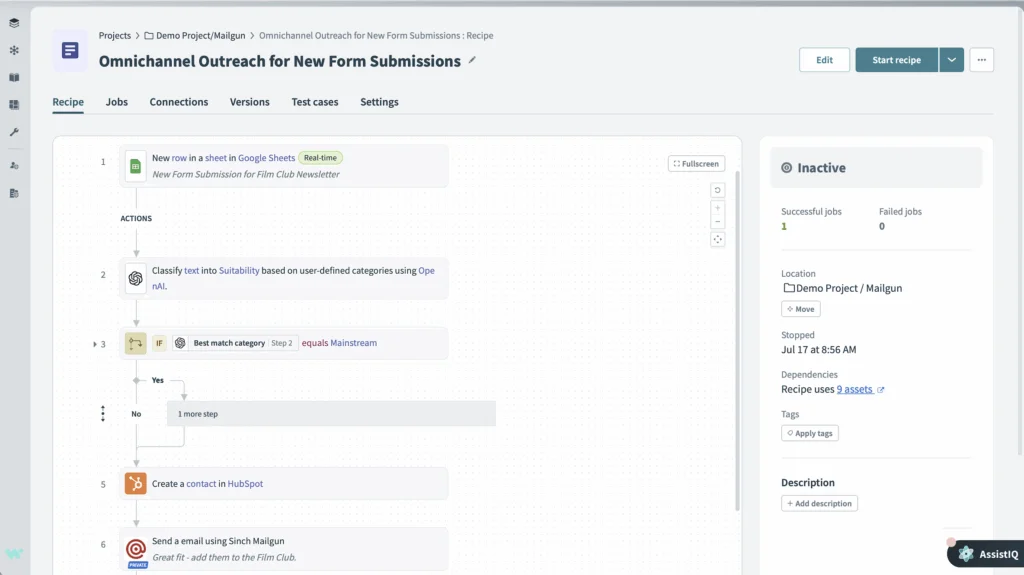
Step 1: Connect your Sinch Mailgun and other app accounts in Workato.
Step 2: Select the trigger app to start the recipe.
Step 3: Pick the action you want the other app (or Mailgun) to perform.
Step 4: Map the data fields to move information between apps.
Example: When a new Shopify order is created, send a transactional email via Mailgun; or when a Mailgun bounce occurs, create a task in Asana.
Why Sinch Mailgun
Why Choose Sinch Mailgun
Trusted deliverability
Developer friendly
Scales with you
FAQs
Frequently asked questions about the Workato integration
Workato is an enterprise automation platform that connects over 1,000 apps through pre-built connectors and a low-code interface. You can automate workflows without heavy development work.
Workato uses Mailgun’s API to create bi-directional data flows. You can trigger actions in other apps from Mailgun events or send Mailgun emails from external triggers.
No. You can build workflows with a drag-and-drop builder. Advanced users can add custom scripts if needed, but coding is not required.
Any webhook event, including sends, opens, clicks, bounces, unsubscribes, and spam complaints, can start a workflow recipe.
Yes. Workato provides encryption, SOC 2 Type II compliance, role-based access, and detailed audit logs to protect your data.
The connector is free to use, but you need active Mailgun and Workato accounts. Workato pricing is tiered by workflows and tasks.