Integrations
Make
Overview
Connect Mailgun’s Email API to over 2,500 apps using Make’s drag-and-drop platform. Build automated email scenarios for marketing, sales, and operations in minutes. Monitor real-time metrics, manage lists, and validate emails without coding. Start free with 1,000 operations per month and scale as you grow.
KEY FEATURES AND BENEFITS:
- Track email events: deliveries, opens, clicks, failures, complaints, unsubscribes
- Send transactional emails triggered by any connected app
- Automate mailing list management across platforms
- Build email validation workflows for cleaner lists
- Visual builder requires no coding
- Works with 2,500+ app connectors, including 400+ AI tools
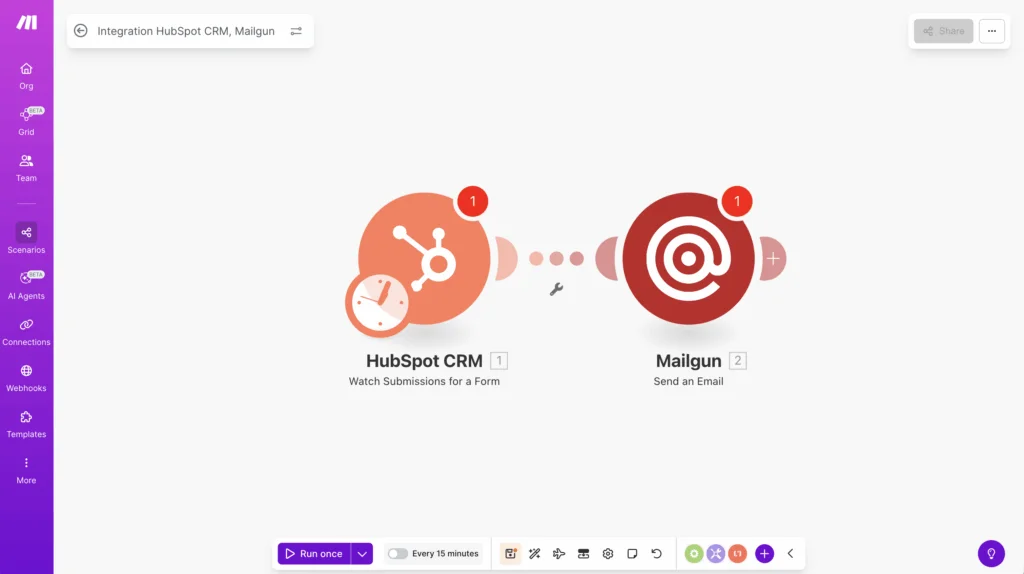
Automate email workflows without coding using the Mailgun Make.com integration and a visual drag-and-drop platform.
Use Cases
Popular ways to use the Mailgun Make integration
Customer onboarding automation
E-commerce order updates
Lead nurturing campaigns
List hygiene and compliance
How To Enable The Integration
Set up the Make.com integration for Mailgun in minutes
Connect Mailgun with Make in four simple steps. No coding required.
Step 1: In Make, create a connection by entering your Mailgun private API key and selecting your region (base URL) from the dropdown.
Step 2: Select a trigger module such as Scheduler, Webhook, or another app’s event.
Step 3: Choose an action like “Send an email” or manage lists, then map the required fields.
Step 4: Test, schedule, and run your automation.
Example: When a Typeform response is submitted, send a Mailgun confirmation email. Or route Mailgun Permanent Failure events to Slack and log them in Google Sheets.
Why Sinch Mailgun
Why Choose Sinch Mailgun
Built for deliverability
Scales with you
Simple, no-code control
FAQS
Frequently asked questions about Make and Mailgun
Connect your Mailgun account in Make by entering your private API key, region, and domain. You can then build automated scenarios.
Track deliveries, opens, clicks, temporary failures, permanent failures, spam complaints, and unsubscribes in real time.
Yes. Make offers a free plan with 1,000 operations per month. Mailgun charges only for the emails you send.
Yes. Add Mailgun’s email validation module in your Make scenario to keep your lists clean and reduce bounces.
No coding required. The drag-and-drop interface lets anyone build and edit workflows.
Most users connect their accounts and send their first automated email in under 10 minutes.