
A Python dictionary is a data structure that stores information in key-value pairs. While keys must be unique and immutable (like strings or numbers), the values can be of any data type, whether mutable or immutable. This makes dictionaries ideal for accessing data by a specific name rather than a numeric position like in list.
Example: This example shows how a dictionary stores data using keys and values.
data = { "name": "Jake", "age": 22 }
print(data)
Output
{'name': 'Jake', 'age': 22}
Explanation:
- "name" and "age" are keys
- "Jake" and 22 are their values
- dictionary stores data in key : value format
Creating a Dictionary
A dictionary is created by writing key-value pairs inside { }, where each key is connected to a value using colon (:). A dictionary can also be created using the dict() function.
d1 = {1: 'Geeks', 2: 'For', 3: 'Geeks'}
print(d1)

# using dict() constructor
d2 = dict(a = "Geeks", b = "for", c = "Geeks")
print(d2)
Output
{1: 'Geeks', 2: 'For', 3: 'Geeks'}
{'a': 'Geeks', 'b': 'for', 'c': 'Geeks'}
Accessing Dictionary Items
A value in a dictionary is accessed by using its key. This can be done either with square brackets [ ] or with the get() method. Both return the value linked to the given key.
d = { "name": "Kat", 1: "Python", (1, 2): [1,2,4] }

# Access using key
print(d["name"])

# Access using get()
print(d.get("name"))
Output
Kat
Kat
Note: Accessing a missing key with [ ] raises a KeyError, while get() is safer because it returns None (or a default value) instead of an error.
Adding and Updating Dictionary Items
New items are added to a dictionary using the assignment operator (=) by giving a new key a value. If an existing key is used with the assignment operator, its value is updated with the new one.
d = {1: 'Geeks', 2: 'For', 3: 'Geeks'}

# Adding a new key-value pair
d["age"] = 22

# Updating an existing value
d[1] = "Python dict"
print(d)
Output
{1: 'Python dict', 2: 'For', 3: 'Geeks', 'age': 22}
Removing Dictionary Items
Dictionary items can be removed using built-in deletion methods that work on keys:
- del: removes an item using its key
- pop(): removes the item with the given key and returns its value
- clear(): removes all items from the dictionary
- popitem(): removes and returns the last inserted key–value pair
d = {1: 'Geeks', 2: 'For', 3: 'Geeks', 'age':22}

# Using del
del d["age"]
print(d)

# Using pop()
val = d.pop(1)
print(val)

# Using popitem()
key, val = d.popitem()
print(f"Key: {key}, Value: {val}")

# Using clear()
d.clear()
print(d)
Output
{1: 'Geeks', 2: 'For', 3: 'Geeks'}
Geeks
Key: 3, Value: Geeks
{}
Iterating Through a Dictionary
A dictionary can be traversed using a for loop to access its keys, values or both key-value pairs by using the built-in methods keys(), values() and items().
d = {1: 'Geeks', 2: 'For', 'age':22}

# Iterate over keys
for key in d:
    print(key)

# Iterate over values
for value in d.values():
    print(value)

# Iterate over key-value pairs
for key, value in d.items():
    print(f"{key}: {value}")
Output
1
2
age
Geeks
For
22
1: Geeks
2: For
age: 22
Read in detail: Ways to Iterating Over a Dictionary
Nested Dictionaries
A nested dictionary is a dictionary that contains another dictionary as one of its values. Below diagram shows how a nested dictionary works, where key 3 points to another dictionary inside the main dictionary.
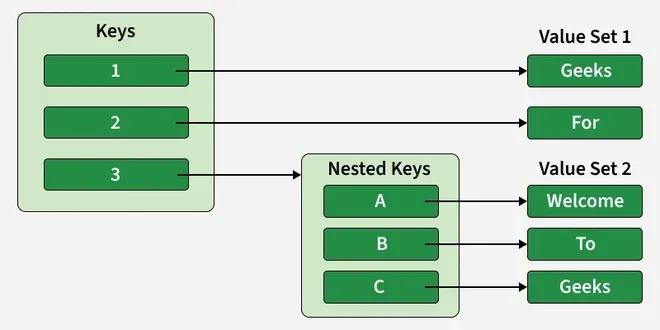
The arrows show how each key is connected to its corresponding value.
d = {1: 'Geeks', 2: 'For', 3: {'A': 'Welcome', 'B': 'To', 'C': 'Geeks'}}
print(d)

Output
{1: 'Geeks', 2: 'For', 3: {'A': 'Welcome', 'B': 'To', 'C': 'Geeks'}}
Read in Detail: Python Nested Dictionary
Related Links:
- Python Dictionary Quiz
- Dictionary Comprehension
- Dictionary Methods
- Dictionary Creation Programs.
- Dictionary Add/Append Programs.
- Dictionary Removal Programs.
- Dictionary Access Programs.
- Dictionary Conversion Programs.
- Python Dictionary Copy Vs Deep Copy
- Python Dictionary Exercise