

Multiplatform Z80 Assembly Development tools
Download
the
new 2026 toolkit - Last update
2026/2/22... New scripts for bigger game files!
* Please Download both and extract - and copy the files in Sources.7z OVER those in Z80DevTools *
Download
the
old 2021 toolkit - Last update
2021/8/08... Now includes ZX81 support!
Watch
the Introduction on Youtube!
|
|
| The
Author strives to ensure these DevTools should all still work on
even Windows XP! The author of these Tutorials uses Linux as his main OS, and does RetroDev in a Windows 7 VM, so even if you don't use windows as your main OS, you should be able to run them in a VM, or any old 'junk pc' you may find! Hint: You can find XP install iso's on Archive.org that don't require activation if you don't have an OS disk to hand! |
 |
| Introduction These Z80 tools are a collection of free software I have collected together with some scripts to allow them to be easily used. These tools are intended to allow a relative beginner to compile simple programs that will compile to multiple 8 bit destination systems. Disclaimer Please use these tools at your own risk. They are provided freely in the hope they will be of use, and have been tested to the best of my ability but I cannot test in all situations or guarantee they will not harm your computer in some unexpected way. These tools have been tested on Windows 10 (32 & 64 bit), Windows 7 64 bit, and Windows XP 32 bit With the exception of MsxHeader and PlusThreeHeader and the scripts and examples I did not write the tools provided in this kit - to my knowledge, all the tools in here are Free and open source, and there is no reason they cannot be redistributed - If you know otherwise, please notify me and I will take appropriate action to resolve the issue. |
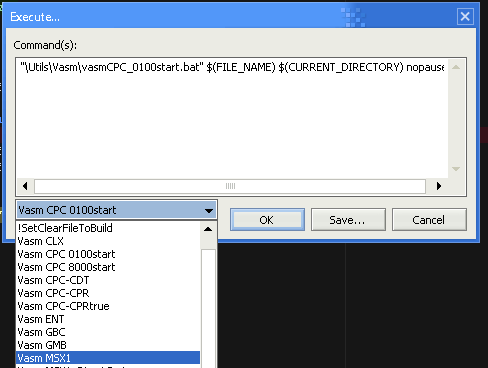 Press F6 in Notepad++ to bring up the assembly menu |
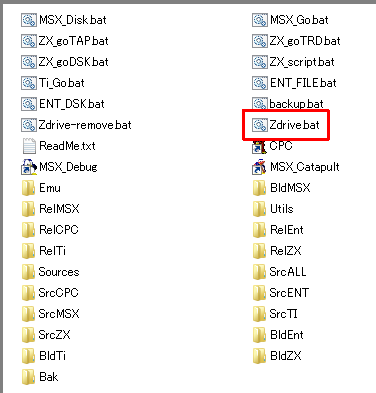
| Usage 1. Create a folder on your computer (Such as LearnZ80) 2. Extract all the Devtools into that folder (Keeping paths) 3. Extract the sources folder from sources.7z into that folder (keeping paths - overwrite if needed - the sources files are newer) 4. Take a look in that LearnZ80 folder... you should see a file called 'Zdrive.bat' - run it now. A new drive letter should 'appear' 'Z:' (or X or y if you already had a Z) This is a fake drive via the 'Subst
command' and is just a convenient way to access the files in the
folder you created... the reason my devtools use it is it's an
easy way to create a guaranteed directory structure that can be
referenced by absolute paths.
5. From that Z Drive click on !Notepad++.bat to start notepad... open the file you want and assemble - everything should work fine. 5. When you are done use "Zdrive-remove" to remove the Z drive Please see my Youtube channel for more examples of how to use these tools. Notes WabbitEmu will not work without a rom file - I cannot provide roms to licensing, so please supply your own MSX_Disk will not work without Sony HitBit rom files (or reconfigure the script to use other rom files you have) - I cannot provide roms to licensing - MSX_GO does not use disk roms and will work fine. EP128emu has OpenGl disabled in the batch file - this is because it caused problems during testing on my Windows 10 virtual machine - it's likely to be an isolated issue, so please edit the ENT_xxx.bat files if you want better performance. The included version of Wabbitemu and OpenMSX are not the latest, this is to maintain WindowsXP compatibility... I did this to make it easy for people who don't use windows to use these tools in a virtual machine - you can update these programs to the latest version if you wish. I've been playing a bit with programming on the Enterprise 64/128, and I'm pretty impressed with the hardware, but because of the relative obscurity of the system, and its failure in the UK, finding english resources has proved difficult. |
 |

|
| View Options |
| Default Dark |
| Simple (Hide this menu) |
| Print Mode (white background) |
| Top Menu |
| ***Main Menu*** |
| My Games |
| Youtube channel |
| Patreon |
| Introduction to Assembly (Basics for absolute beginners) |
| AkuSprite Editor |
| ChibiTracker |
| Dec/Bin/Hex/Oct/Ascii Table |
| 68000 Content |
| ***68000 Tutorial List*** |
Learn 68000 Assembly  |
| Hello World Series |
| Platform Specific Series |
| Simple Samples |
| Grime 68000 |
| 68000 Downloads |
| 68000 Cheatsheet |
| Sources.7z |
| DevTools kit |
| 68000 Platforms |
| Amiga 500 |
| Atari ST |
| Neo Geo |
| Sega Genesis / Mega Drive |
| Sinclair QL |
| X68000 (Sharp x68k) |
| 8086 Content |
| Learn 8086 Assembly |
| Platform Specific Series |
| Hello World Series |
| Simple Samples |
| 8086 Downloads |
| 8086 Cheatsheet |
| Sources.7z |
| DevTools kit |
| 8086 Platforms |
| Wonderswan |
| MsDos |
| ARM Content |
| Learn ARM Assembly |
| Learn ARM Thumb Assembly |
| Platform Specific Series |
| Hello World |
| Simple Samples |
| ARM Downloads |
| ARM Cheatsheet |
| Sources.7z |
| DevTools kit |
| ARM Platforms |
| Gameboy Advance |
| Nintendo DS |
| Risc Os |
| Risc-V Content |
| Learn Risc-V Assembly |
| Risc-V Downloads |
| Risc-V Cheatsheet |
| Sources.7z |
| DevTools kit |
| MIPS Content |
| Learn Risc-V Assembly |
| Platform Specific Series |
| Hello World |
| Simple Samples |
| MIPS Downloads |
| MIPS Cheatsheet |
| Sources.7z |
| DevTools kit |
| MIPS Platforms |
| Playstation |
| N64 |
| PDP-11 Content |
| Learn PDP-11 Assembly |
| Platform Specific Series |
| Simple Samples |
| PDP-11 Downloads |
| PDP-11 Cheatsheet |
| Sources.7z |
| DevTools kit |
| PDP-11 Platforms |
| PDP-11 |
| UKNC |
| TMS9900 Content |
| Learn TMS9900 Assembly |
| Platform Specific Series |
| Hello World |
| TMS9900 Downloads |
| TMS9900 Cheatsheet |
| Sources.7z |
| DevTools kit |
| TMS9900 Platforms |
| Ti 99 |
| 6809 Content |
| Learn 6809 Assembly |
| Learn 6309 Assembly |
| Platform Specific Series |
| Hello World Series |
| Simple Samples |
| 6809 Downloads |
| 6809/6309 Cheatsheet |
| Sources.7z |
| DevTools kit |
| 6809 Platforms |
| Dragon 32/Tandy Coco |
| Fujitsu FM7 |
| TRS-80 Coco 3 |
| Vectrex |
| 65816 Content |
| Learn 65816 Assembly |
| Hello World |
| Simple Samples |
| 65816 Downloads |
| 65816 Cheatsheet |
| Sources.7z |
| DevTools kit |
| 65816 Platforms |
| SNES |
| eZ80 Content |
| Learn eZ80 Assembly |
| Platform Specific Series |
| eZ80 Downloads |
| eZ80 Cheatsheet |
| Sources.7z |
| DevTools kit |
| eZ80 Platforms |
| Ti84 PCE |
| IBM370 Content |
| Learn IBM370 Assembly |
| Simple Samples |
| IBM370 Downloads |
| IBM370 Cheatsheet |
| Sources.7z |
| DevTools kit |
| Super-H Content |
| Learn SH2 Assembly |
| Hello World Series |
| Simple Samples |
| SH2 Downloads |
| SH2 Cheatsheet |
| Sources.7z |
| DevTools kit |
| SH2 Platforms |
| 32x |
| Saturn |
| PowerPC Content |
| Learn PowerPC Assembly |
| Hello World Series |
| Simple Samples |
| PowerPC Downloads |
| PowerPC Cheatsheet |
| Sources.7z |
| DevTools kit |
| PowerPC Platforms |
| Gamecube |
| My Patreon backers |
| Thanks to all my supporters who allow this site to keep going: Ack, Adolfo Perez Alvarez Alejandro Gil Cal Alejandro Pérez Barry White, Brett Owen burnout_x1, Chris Lidyard CPU, damarty, Dave Snowdon Dimitris Topouzis, Dioniso Dirk Adam, Ervin Pajor Fábio Domingos, Ferro0xid FNQMatt, Indy S, ishotjr James Whitwell Juergen Pichler, Justin Leo Comerford, m00n MacTORG Steen, Marco Leal Mark Sparham, Mark Trombly Markus Podszuk (Brainslave) Matt Kasdorf (KnightFire66) Mikebloke, MrDave6309, NAZ Neil Moore, pagetable.com Peter Beständig Robin Elvin, robsoft Roland Rząsa, schmosef SethSR, ske286, Str33tz SUPERDIVORCE Trevor Briscoe Voyager_Sput William Torres  

Images/Links are those provided by my supporters and should not be assumed to represent the values of this sites author 
|
Buy my Assembly programming book
on Amazon in Print or Kindle!
Available worldwide!
Search 'ChibiAkumas' on
your local Amazon website!
Click here for more info!

Buy my Assembly programming book
on Amazon in Print or Kindle!
Available worldwide!
Search 'ChibiAkumas' on
your local Amazon website!
Click here for more info!
Buy my Assembly programming book
on Amazon in Print or Kindle!
Available worldwide!
Search 'ChibiAkumas' on
your local Amazon website!
Click here for more info!