X Tutup

Garry's Mod Wiki

cam.PushModelMatrix

  cam.PushModelMatrix( VMatrix matrix, boolean multiply = false )

Description

Pushes the specified matrix onto the render matrix stack. Unlike opengl, this will replace the current model matrix.

This does not work with cam.Start3D2D if multiply is false.
When used in the Paint function of a panel, if you want to rely on the top-left position of the panel, you must use VMatrix:Translate with the (0, 0) position of the panel relative to the screen.

Arguments

1 VMatrix matrix
The matrix to push.
2 boolean multiply = false
If set, multiplies given matrix with currently active matrix (cam.GetModelMatrix) before pushing.

Example

Simple function to draw rotated and/or scaled text.

local vector_one = Vector( 1, 1, 1 ) function draw.RotatedText( text, font, x, y, color, ang, scale ) render.PushFilterMag( TEXFILTER.ANISOTROPIC ) render.PushFilterMin( TEXFILTER.ANISOTROPIC ) local m = Matrix() m:Translate( Vector( x, y, 0 ) ) m:Rotate( Angle( 0, ang, 0 ) ) m:Scale( vector_one * ( scale or 1 ) ) surface.SetFont( font ) local w, h = surface.GetTextSize( text ) m:Translate( Vector( -w / 2, -h / 2, 0 ) ) cam.PushModelMatrix( m, true ) draw.DrawText( text, font, 0, 0, color ) cam.PopModelMatrix() render.PopFilterMag() render.PopFilterMin() end hook.Add("HUDPaint", "2d rotation test", function() local w, h = ScrW(), ScrH() local ang = RealTime() * 50 local scale = ( math.sin( ang / 10 ) + 2 ) * 0.5 draw.RotatedText( "My fancy Rotating Text", "DermaLarge", w / 2, h / 2, color_white, ang, scale ) end)
Output:

Example

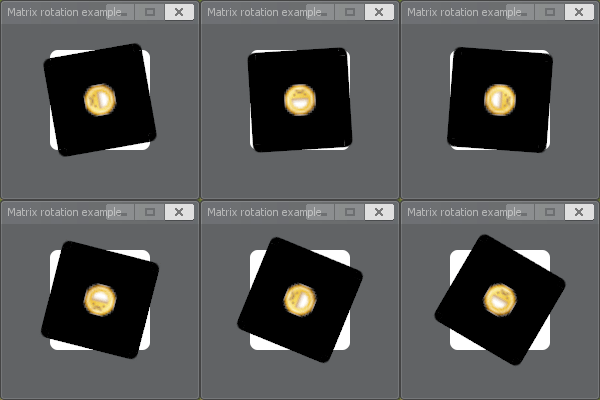
Rotating a box while keeping it's matrix positions relative to the panel.

concommand.Add("test_matrix", function() local menu = vgui.Create( "DFrame" ) menu:SetSize( 200, 200 ) menu:SetTitle("Matrix rotation example") menu:SetPos( 200, 200 ) local panel = menu:Add( "DPanel" ) panel:SetSize( 100, 100 ) panel:Center() local grin = Material("icon16/emoticon_evilgrin.png", "smooth noclamp") local angle = 0 function panel:Paint(w, h) draw.RoundedBox( 8, 0, 0, w, h, color_white ) -- time to draw our matrix local m = Matrix() -- to keep the matrix relative to the panel, we get the center of it relative to the screen local x, y = self:LocalToScreen( w / 2, h / 2 ) local center = Vector( x, y, 0 ) m:Translate( center ) m:Rotate( Angle( 0, angle, 0 ) ) m:Translate( -center ) -- rotate the angle after drawing for next time angle = angle + FrameTime() * 60 -- push a filter mag to take away the crispiness render.PushFilterMag( TEXFILTER.ANISOTROPIC ) render.PushFilterMin( TEXFILTER.ANISOTROPIC ) cam.PushModelMatrix( m ) draw.RoundedBox( 8, 0, 0, w, h, color_black ) surface.SetDrawColor( 255, 255, 255, 255 ) surface.SetMaterial( grin ) surface.DrawTexturedRect( w/2-16, h/2-16, 32, 32 ) cam.PopModelMatrix() render.PopFilterMag() render.PopFilterMin() end end)
Output:
gmod_UtOWgVrILW.gif

Example

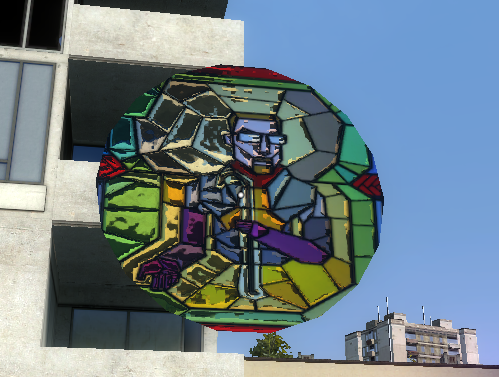
Draws a mesh at where the local player is looking at, without regenerating the mesh every frame.

local mat = Material( "models/shadertest/shader5" ) -- The material local mat2 = Material( "models/wireframe" ) -- The material (a wireframe) local segCount = 18 local radius = 100 -- Generate the vertices for a circle mesh, using simple trigonometry. -- We also calculate UV coordinates for texturing the mesh. local center = { pos = Vector( 0, 0, 0 ), u = 0.5, v = 0.5 } local verts = {} for j = 1, segCount do local angle1 = ( ( j - 1 ) / segCount ) * math.pi * -2 local angle2 = ( j / segCount ) * math.pi * -2 local v1 = { pos = Vector( math.cos( angle1 ) * radius, math.sin( angle1 ) * radius, 0 ), u = math.cos( angle1 ) * 0.5 + 0.5, v = math.sin( angle1 ) * 0.5 + 0.5 } local v2 = { pos = Vector( math.cos( angle2 ) * radius, math.sin( angle2 ) * radius, 0 ), u = math.cos( angle2 ) * 0.5 + 0.5, v = math.sin( angle2 ) * 0.5 + 0.5 } verts[#verts + 1] = center verts[#verts + 1] = v1 verts[#verts + 1] = v2 end local obj = Mesh() -- Create the IMesh object mesh.Begin( obj, MATERIAL_TRIANGLES, segCount ) -- Begin writing to the static mesh for i = 1, #verts do mesh.Position( verts[i].pos ) -- Set the position mesh.TexCoord( 0, verts[i].u, verts[i].v ) -- Set the texture UV coordinates mesh.AdvanceVertex() -- Write the vertex end mesh.End() -- Finish writing to the IMesh hook.Add( "PostDrawOpaqueRenderables", "MeshLibTest", function() render.UpdateRefractTexture() render.SetMaterial( mat ) local playerTrace = LocalPlayer():GetEyeTrace() local m = Matrix() m:Translate( playerTrace.HitPos + playerTrace.HitNormal * 10 ) m:Rotate( playerTrace.HitNormal:Angle() ) m:Rotate( Angle( 0, -90, -90 ) ) render.ResetModelLighting( 1, 1, 1 ) cam.PushModelMatrix( m ) obj:Draw() -- Draw the mesh cam.PopModelMatrix() end )
Output:
image.png
X Tutup