SliderMaster
A downloadable tool
SliderMaster- is a software tool developed by VE3CKO - Mike Kovacich, to work side-by-side with your FlexRadio to bring you nice, neat access to adjust the DSP levels, legacy and new. This is free and available to all, donation are welcome.
It has been tested by some beta testers and we feel now ready for general release. I'd like to first thank the testers for providing vital feedback. As I release more beta versions I hope to continue to have your assistance.
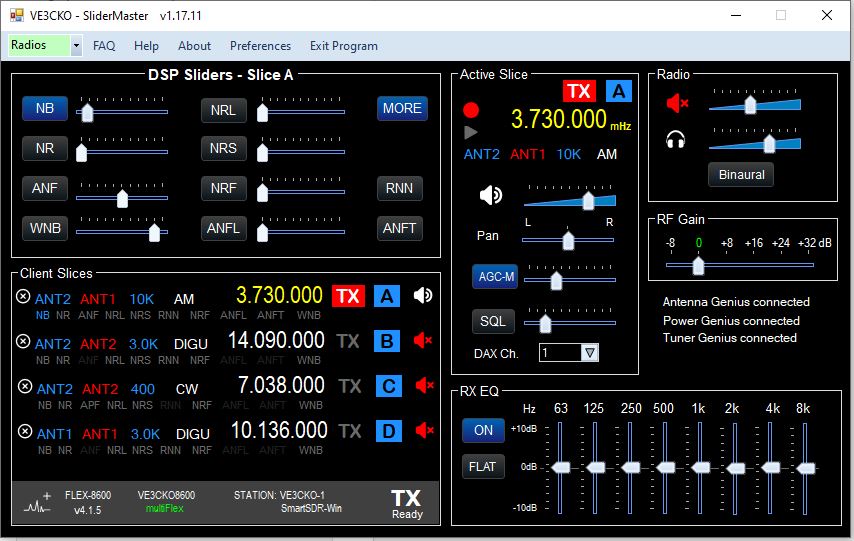
How it works is, when first starting the program, if it's the only radio on the LAN, it should connect automatically. If you have one radio on your LAN and it doesn't connect automatically, or if you have more than one FlexRadio on your LAN you can select which radio you wish to use from the Radios drop-down in the menu bar. Please note each FlexRadio on your LAN must have a unique NickName.
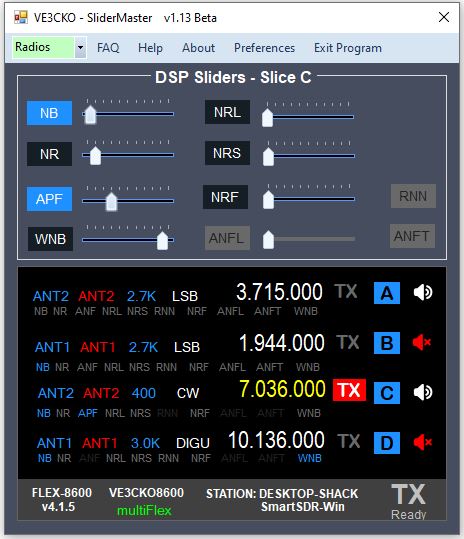
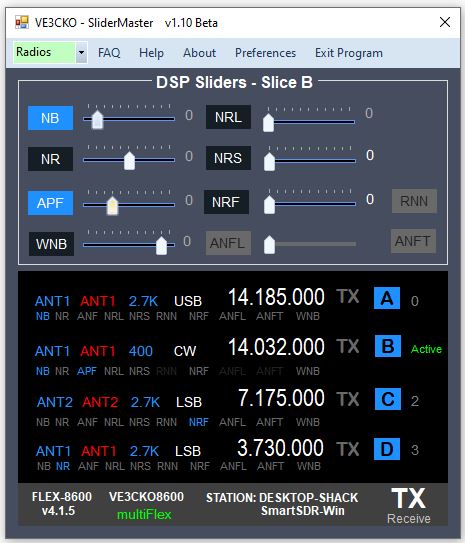
The tray at the bottom conveniently shows some information in similar fashion to SmartSDR. This includes the radio model, nickname, SSDR version, the connecting station and program, as well as the TX and multiFLEX flags.
On startup:
1. If no client is connected to the radio, the slice window will remains black, waiting. When a client is connected to the radio, the slice window will populate with all slices in use by that client, showing basic information and DSP status of each slice.
2. If a client is already open on startup SliderMaster selects the Active slice of the client and displays the DSP information accordingly.
To change the Active slice simply click on the slice letter in blue.
When client is closed, still shows radio connected to previous station because the app is still connected, see the tray at the bottom.
For convenience, on the first slice A, you can toggle on/off any available DSP by clicking directly on the "NB" for example.
MORE - Bonus Features: (available with a donation)
Clicking the MORE button extends the program window and opens up access to slice and radio controls that are often necessary to tweak your listening experience. such as slice volume, agc as well as other related features that are all right there, no going back and forth to SmartSDR to adjust the AGC-T, etc. . This is especially helpful to those with FlexRadio M models, or Maestro's, as it required digging into the touchscreen menu and this can be challenging.
This has been significant work and more is needed. With the release of v1.13 there is a sneak peak of some of these features, with a timer for about a minute of use, then it closes. To have access to these Bonus Features without the timeout, a donation must be made.
To keep this basic app free, please consider a donation. Contributions will encourage continued development of this app as well as others apps coming out by VE3CKO. Again, a donation is optional, and would suggested amount of $30, but that is up to you.
To make a PayPal payment, send to: paypal@interpc.ca or
Known Issues:
- Right now this is for one client connection. I have work to do for when a second client is connect to the same radio, not sure if this is even a desirable feature.
- In the Client Slices display window for slice A you can toggle any DSP on/off with a direct mouse click. I purposely only enabled slice A for the time being. Not sure if this will get much usage.
- Having inconsistency with a 2nd radio on the LAN. Related issue when more than one radio is on the LAN, how it automatically connects to one of the radios
- Using Marcus's iPad as a client, even though the DSP sliders are shown and can be adjust on Marcus's app, it doesn't seem to update it's sliders or when DSP is toggled. For example turning on NR from Flex DSP sliders or adjust it's level, does change the NB in the panadapter but does not update the NB status in the DSP popup on the iPad , NB levels are not updated. However if you adjust NBon the iPad, Flex DSP Sliders do see the changed. I don't think the iPad is looking for change DSP levels coming from the radio.
- RFgain currently on affect one panadapter. This will be fixed in future release.
- SliderMaster validation currently is only for one PC on a LAN, this will be fixed in a future release to allow to have more then one PC with SliderMaster Bonus Features.
- When installing a new version, you MUST uninstall previous version first.
- It is assumed the PC will be connected to same LAN so to see a FlexRadio. If no LAN is connected to PC running SliderMaster, app goes in limbo. In a future release, there will be a message box to inform, no LAN connection has been detected.
CHANGE LOG:
General Release
*********************** V1.17.11 ************************ released Monday Mar.9th
- Added Genius products detection in Preferences (for future use)
- Fixed filter selection in Active Slice group
- Fixed Help screen so it's sizable and new size is saved
- Should ask to repair or remove previous version, choose remove, then click the setup file again to install new version. If it does not do this then your registry might be dirty from previous installs and you should just do a manual uninstall, Setting. SliderMaster, Uninstall.
*********************** V1.17.7 Beta ************************ released Sunday Mar.8th
NOTE: To those who have donated and with version 1.17 comes a new validation server, so you will need to re-validate. To do that first email me ve3cko@interpc.ca request a validation reset, be sure to include your callsign in the email. You will then be notified it's been reset. You then go to Preferences, make sure your callsign is saved. Click the Get Key button, it should turn green and cahange to VALIDATED.
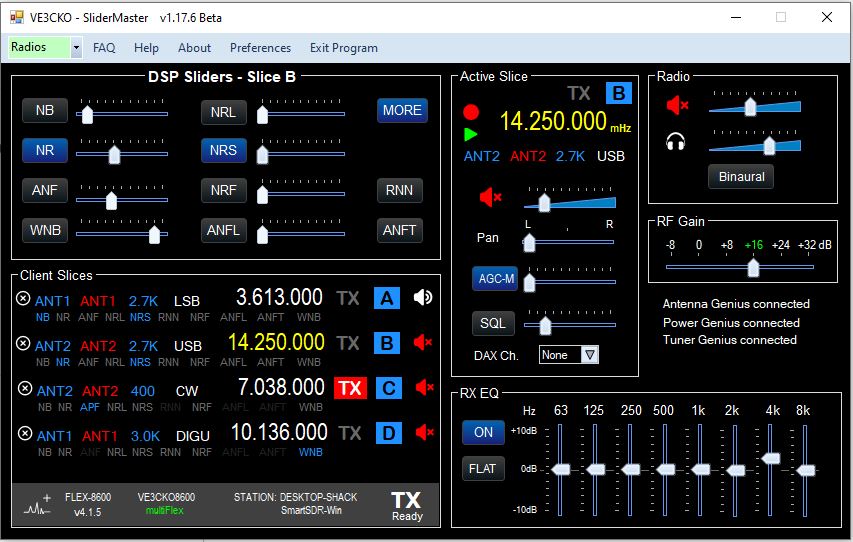
- Added New Feature: You can now see and select RXant, TXant, Filter and Mode in the Active Slice group under frequency.
- Added change RXant, TXant, Filter and Mode in Active Slice, select by click on
- Added Frequency color of xmit slice changes to red during transmission.
- Fixed, when client disconnected features in Active Slice area disabled, prior if they were clicked would cause an Exception error.
- Fixed closing program, can now be either "X" top-right or "Exit Program"
- Added when program is closed, remembers the screen position of app as well as if MORE panel was opened or closed.
- Fixed RX EQ levels adjusting, ON/OFF, FLAT
- Fixed MORE closing with band changes, slice added or removed.
- Fixed Client Slices window height for 2, 4 and 8 slice radios.
- Fixed volume slider color recall in Preferences.
- Issue, RX EQ levels adjusting, ON/OFF, FLAT not functional
- Issue, RFgain just adjust for one pan, to be fixed.
*********************** V1.16 Beta **************************** released Feb.16th
- Fixed error regarding the path for the Logfile.
*********************** V1.15 Beta **************************** released Feb.16th
- Fixed client TX slice being removed when SliderMaster starts.
- Added TX select by clicking on the desired TX slice.
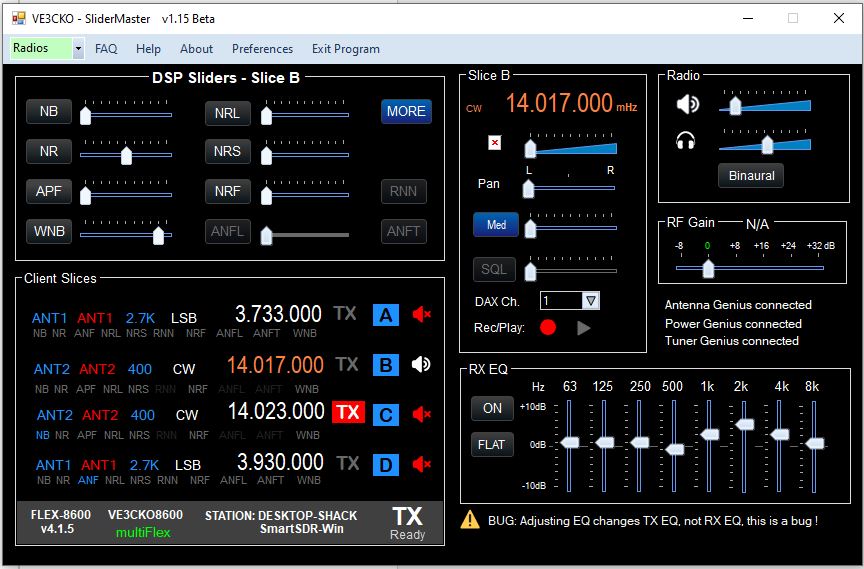
- Added Frequency and mode to top of Active Slice area.
- Added, feature to change 1hz, 10hz, 100hz and 1000hz steps using MouseWheel, (similar to PowerSDR), by moving mouse underneath the digit, then use MouseWheel up/down.
- Fixed "Change slice Frequency, MouseWheel up/down" when hover over NR.
- Fixed slice vol, pan and agc mousehover showing when not suppose to
- Fixed Name in Preferences not showing after being saved.
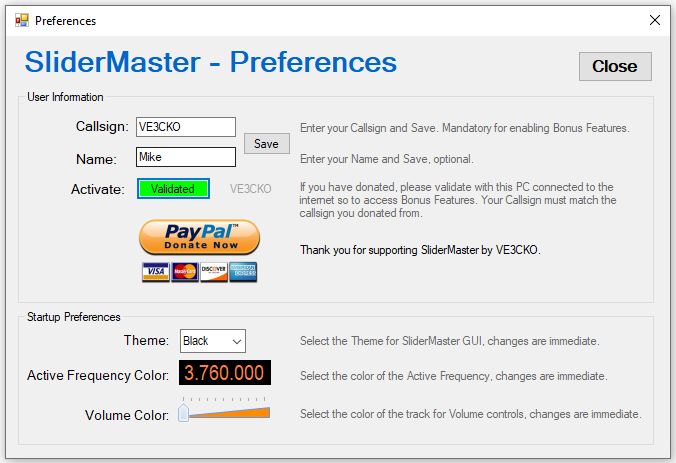
- Added new buttons and new Black, DimGray themes.
- Added to Preferences, ability to select Volume Color.
- Added see changes immediately when changing: Theme, Volume Color, and Active Frequency Color.
- Added toottip detailed caption for each DSP from Ken Wells that suggests the best scenarios to use each DSP. See FAQ for Ken's full technical reference.
*********************** V1.14 Beta **************************** released Feb.14th
- Removed Debug label
- Added slice Frequency adjusting with MouseWheel up/down
- Fixed ticks for slice volume, radio volume and headphone volume
- Fixed RX filters greater than 4k to display one decimal place eg. 8.2k
*********************** V1.13 Beta **************************** released Feb.14th
- Fixed issue with TX slice on client being turned off when SliderMaster starts
- Fixed when slice selected only the DSP features for the current mode are available as should be.
- Changed method to show active slice in the slice Window, the frequency color now indicates the active, and is user defined in Preferences.
- Added slice mute speaker beside each slice letter & slice box.
- DSP levels now show in bubble when mouse is hovered over the slider
- DSP description shown when hovering over DSP button.
- Minimize window feature put back.
- Added screen position persistence, for About, Help, FAQ and Preferences.
- Added RX EQ, loads current RX EQ per selected profile. - Bonus Features
- Added DAX- Bonus Feature.
- Added Record/Play - Bonus Feature.
- Bonus Feature free preview for set time. of 10 min. then have to OK and just open the MORE button again.
- People who have or will contribute via donation will be able to validate to remove this time out preview.
- Donation, validation process added.
- PGXL, TGXL and AG detection for future use.
- Not Fixed, adjusting EQ levels changes TX EQ, it should change RX EQ!!!
- Not Fixed, adjusting RFgain does not actually change RFgain, yet.
*********************** V1.12 Beta ***********************
- Fixed NRL, ANFL and ANFT available for 6000 series radios.
- Fixed app width for 6000 series radios.
- Fixed HELP link, "How to allow a program through a firewall on your computer".
- Fixed FAQ: SmartSDR v4 – Noise Mitigation Quick Reference - by Tim Ellison
*********************** V1.11 Beta ***********************
- Added FAQ: SmartSDR v4 – Noise Mitigation Quick Reference - by Tim Ellison
- Added FAQ: Filter-by-Filter SNR Guidelines - by Michael Walker
*********************** V1.10 Beta ***********************
- Added dark theme, and ability to select other themes in Preferences.
- Updated sliders with slider values shown in tooltip bubble, just like Flex.
- Added screen position persistence, startup screen position at location of where it was when "Exit Program".
- Fixed several thing upon startup including showing Active slice and appropriate DSP information for that slice.
*********************** V1.09 Beta ***********************
- Added automatic resizing of slice window and app based on radio model & # of slices in use
- Simplified connect/disconnect to radio(s) from Radio drop-down
- Fixed Station at bottom to correctly show status of Station connection
- Fixed so Active slice on startup defaults to slice 0
- Added paypal.me/VE3CKO for donation in the About tab
- Change some coloring in title bar
- Preparing Preferences - eg if more than one radio, which radio is preferred to connect upon startup. This will help resolve known issue #3.
*********************** V1.08 Beta ***********************
- Added APF when in CW mode
- Fixed Filter display mode dependency
- Added Radio Info tooltip - hover on Model
- Fixed issue introduced in v1.06 regarding 6700
*********************** V1.07 Beta ***********************
- Renamed application "SliderMaster"
- Please uninstall previous FlexDSPsliders before installing SliderMaster
- Fixed CLOSE btn in Help
*********************** V1.06 Beta ***********************
- Fixed client station & client program in bottom tray
- Added Desktop shortcut - Dave wo2x
- Manually must uninstall previous version
- preparing for renaming App
*********************** V1.05 Beta ***********************
- Fixed slices 5, 6, 7 in slice display
- Fixed polling DSP levels when client initially connects and when slice gets added
*********************** V1.04 Beta ***********************
- Added Radio selection in menu strip for radio selection
- Fixed slice display when client removes a slice(s) then adds a slice(s)
- Fixed if client is closed down by client, to black out slice display
Download
Install instructions
Thank you for participating as a Beta Tester. Your feedback is important so I can fine tune to get to a general release.
To install open up the .zip file and execute the setup.exe file.
If you have a client already open like SmartSDR or Maestro, when you open the program it will load up all the active slices on that client into the slice area display.
Please note to close the program use the Exit Program in the top menu and not the "X" in the top right of the window. Exit Program properly closes down the app, where "X" just closes the User Interface and may leave an app process in the background.
Please do not share the password to this site, during this final development stage I want to keep this close at hand til the final release, then the site will be public, no password necessary.
- - - For PayPal donations: https://paypal.me/VE3CKO - - -


Leave a comment
Log in with itch.io to leave a comment.