

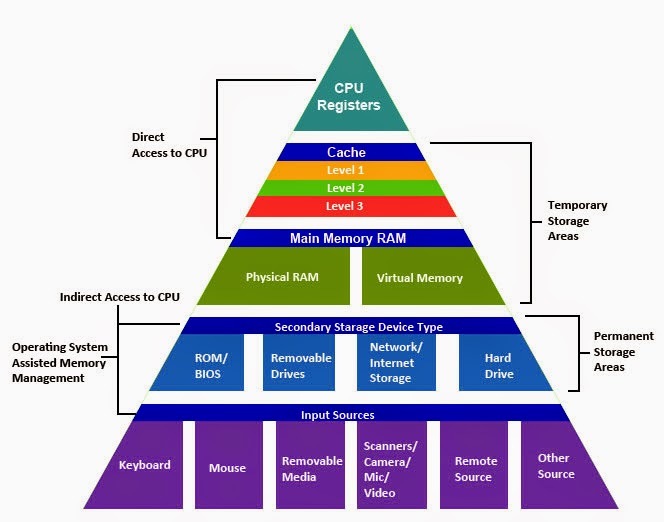
When computers were starting to be used, it only had a single type of memory that it could access and often times it was faster than the CPU. However, as the CPU developed, memory speeds were lagging to the point where the CPU was now faster than the memory. While there are forms of memory that are as fast as the processor, having high performance parts tends to be way too expensive. Not to mention that it'd have to be on the processor itself otherwise even the small distances will cause the apparent speed to be lower.
Cue the memory hierarchy, which is different levels of memory that have different performance rates, but all serve a specific purpose. The good news is though, advancements and research in better memory and communication technology has allowed the hierarchy to shrink.
Memory can be generalized into five hierarchies based upon intended use and speed. If what the processor needs isn't in one level, it moves on to the next to look for what it needs. The first three hierarchies, registers, cache, and main memory, are currently volatile memory. This means once the power is cut from them, they lose their data. The last two are not volatile and are considered permanent storage.
Registers
Typical access time: One clock cycle
Registers are SRAM cells that usually hold up the largest word the CPU can process, usually 32-bit or 64-bit. The most important register, found in all processors, is the program counter. This tells where the next instruction is at. Two other registers typically found in processors for dedicated use are the status register (used for decision making) and the accumulator (used to store operation results). For a time, there used to be other registers for dedicated purposes, but eventually most processor designs kept only the program counter and status word as the dedicated use registers while the rest were general purpose.
The number of registers a CPU has depends on the instruction set architecture (ISA) and the implementation of the CPU itself. For instance, early traditional complex instruction set computer (CISC) CPUs had fewer registers than later reduced instruction set computer (RISC) CPUs. This came down to the design philosophy of RISC simplifying what locations instructions can get there data from and having more registers has its benefits. Modern processors today have many, many times more registers than what the ISA specifies, though programmers are only allowed to use the ISA specified ones. The additional registers are to help the CPU process more instructions at once and in any order it thinks is faster.
Cache
Typical access time: Depends on the level, with fastest access between a few clock cycles for the lowest level to up to hundreds for the highest level.
Cache is a block of SRAM found either in the same die as the processor or off die but close by to minimize latency. Cache holds frequently or recently accessed chunks of data from main memory. The idea is the more times that piece of data is accessed, the closer access time approaches cache speed. In modern designs, most CPUs have at least two levels of cache per core: one that holds data on what program it's working right now and another to hold data for other programs it was working on. Multi-core processors typically have a third level that's shared among cores. Some designs have an L4 cache, but anything beyond that is unheard of.
Simpler processors, such as microcontrollers, either have fewer levels of cache or forgo it altogether as SRAM-based main memory is built right into it. Other processors may even have something called "L0" cache, which is only used by specific parts of the execution unit in the processor.
Main Memory
Typical access time: Hundreds of clock cycles
Most commonly called RAM. Modern main memory is made of DRAM mostly for density reasons. Main memory is relatively fast and holds most of the data and instructions that are needed by currently running programs. This used to be a precious resource up until the mid to late 2000s. Today, memory is so plentiful that modern-day operating systems will store portions of core data of commonly used programs in unused space (which is also called caching) so that when opening that program, it appears to load a lot faster.
Secondary Memory
Typical access time: Tens of thousands clock cycles for the fastest SSDs to millions for HDDs
Secondary memory is where data can be permanently stored, usually a hard disk drive (HDD) or solid-state disk (SSD). Currently the fastest SSDs can perform only at a fraction of the bandwidth and latency of DRAM note , but Intel's Optane solid state memory technology had significantly closed the gap.
Removable memory
Typical access time: Depends on the device or interface
Data that's intended to move around resides on removable memory. Examples include floppy disks, CDs and DVDs, and USB thumb disks. Historically the biggest drawback is that they were really slow, both in terms of the interface and the storage hardware itself. However, modern interfaces like USB 3.2 and Thunderbolt can allow removable memory to be as fast as secondary memory.
The Factory Analog
A way to comprehend this is to think of computer as a factory and the data the parts and materials needed to make the product.- A register is the current step of the assembly. The parts are right there and the line worker can put them in the computer.
- Cache are bins at the assembly station contain parts that will be used. As long as the parts are in the bin, the workers don't have to go very far to get what they need. The only point about the factory analog here is that the parts bins will have to be refilled.
- Main memory are the parts and materials that the company has in storage like a local warehouse or in a storage closet.
- Secondary memory is the distributor who the company orders parts and materials from.
- Removable memory could be thought of the distributor's supplier.
The Physics Test Analog
Another example is to pretend you're taking a physics test. It's open notes, but you also decide to take a a cheat sheet.- A register would hold the current formula you're using right now. You'll promptly toss this out of your head when you're done. Latency is essentially 0, because it's in your mind right now.
- Cache would be holding the formulas you memorized. Occasionally you'll have a brain fart. Latency is a little longer, but since you have it committed to memory, you're not spending time looking up the formula
- Main memory is the cheat sheet you have. It holds all the pertinent information you could use. It takes longer to reference your cheat sheet, but once you reference it enough times, it'll stick to your head. But you might forget something minor or you're not quite sure how it worked...
- Secondary memory is your notes. This may have a condensed version of what's in your book, sort of like how installing a program doesn't exactly copy everything to the hard drive. This takes a while because you need to first find the section that has the right information, then go through it and make sense of it. Though this doesn't go to your cheat sheet, unlike an actual computer.
- Removable memory would be your books. Since you couldn't take your books, you could lack the necessary "program" to solve your problem.
