X Tutup

CasperGaming

Plugins + More
Regular
Joined
Mar 15, 2012
Messages
799
Reaction score
1,444
First Language
English
Primarily Uses
RMMZ
[CGMZ] Extra Stats
By: Casper Gaming
Last Update: February 28, 2026
Latest Version: 1.5.1
Forum-Header-Introduction.png
Tracks additional game data such as gold spent at shops, damage taken, items used, and many more. This data is stored in variables so it is easy to access in events. Turn tracking on/off any time.
Forum-Header-Features.png
  • Track the following stats in variables: gold spent/earned at shop, items bought/sold from shops, damage taken/dealt, items used, and gold looted from battle
  • Turn tracking on/off at any time
  • Track to either game variables or internally with CGMZ data
  • Statistics scene
Forum-Header-Screenshots.png
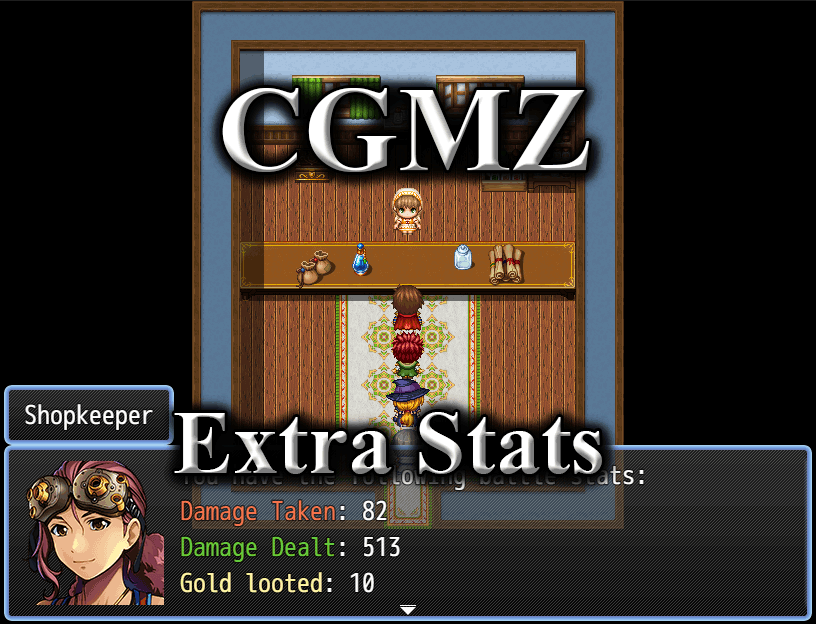
A shopkeeper lists off some tracked stats
extrastat1.png
A shopkeeper lists off more tracked stats
extrastat2.png
Forum-Header-Video.png

Forum-Header-HowTo.png
Import into plugin manager and enable the plugin. Some customization options available. Further instructions in plugin.
Forum-Header-Download.png
Plugin (along with all my other plugins) can be found here: https://www.caspergaming.com/plugins/cgmz/extrastats/
Requires CGMZ Core plugin: https://www.caspergaming.com/plugins/cgmz/core/

Also available on Itch.io:
Forum-Header-CreditAndTerms.png
https://www.caspergaming.com/terms-of-use/
Forum-Header-VersionHistory.png
Version 1.1.0
  • Added tracking for actor-specific stats (times attacked, times attacked with, times used skills).
  • Added plugin command to get party stats
  • Added plugin command to get actor stats
  • This plugin now works in saved games from before this plugin was added
  • Documentation update
Version 1.1.1
  • Added Spanish language help documentation
  • This plugin now warns instead of crashes on invalid JSON parameter
Version 1.2.0
  • Added tracking for how many times each item was bought/sold/used
  • Added tracking for how many times each enemy has been defeated
  • Added tracking for how many times each actor has died
  • Fixed bug with some stats returning undefined in rare cases
  • Fixed bug with updated plugin in saved games
Version 1.3.0
  • Added scene to display tracked statistics
Version 1.3.1
  • Added [CGMZ] Window Backgrounds integration
  • Added custom space display option
Version 1.3.2
  • Added [CGMZ] Window Settings integration
Version 1.4.0
  • Added [CGMZ] Idle integration
  • Added [CGMZ] New Game Plus integration
  • Custom Variables should now show locale based separators
Version 1.5.0
  • Added [CGMZ] Achievements integration
Version 1.5.1
  • Divider now automatically takes up its own line
 
Last edited:

CasperGaming

Plugins + More
Regular
Joined
Mar 15, 2012
Messages
799
Reaction score
1,444
First Language
English
Primarily Uses
RMMZ
Hi all,

Added a demo for this plugin today in case anyone was confused on how to use it (will be going through all my plugins and making demos over the next few weeks), you can play it in-browser or download it from the plugin's main page on my website: https://www.caspergaming.com/plugins/cgmz/extrastats/
 

SpookyOn3

Villager
Member
Joined
Sep 29, 2020
Messages
27
Reaction score
7
First Language
English
Primarily Uses
Other
Im kinda new so having trouble installing this. I get error. Where do I add the extra stats?
 

SpookyOn3

Villager
Member
Joined
Sep 29, 2020
Messages
27
Reaction score
7
First Language
English
Primarily Uses
Other
Im trying to add the extra stats but now error is gone for some reason but I dont see where I add the extra stats.

ReferenceError
CGMZ_Temp is not defined
 

CasperGaming

Plugins + More
Regular
Joined
Mar 15, 2012
Messages
799
Reaction score
1,444
First Language
English
Primarily Uses
RMMZ
@SpookyOn3 This plugin requires CGMZ Core, you either do not have that or you have it installed below this plugin. CGMZ Core should be above all other CGMZ plugins in the plugin manager.

The stats are tracked in the variables you set up in the plugin parameters. Additionally you can access them via script calls given in the plugin documentation, for example: $cgmz.getExtraStats("itemsBought")
 

SpookyOn3

Villager
Member
Joined
Sep 29, 2020
Messages
27
Reaction score
7
First Language
English
Primarily Uses
Other
Oh okay yes forgot about the core so its not at the top.
 

cchmaster

Regular
Regular
Joined
Nov 3, 2020
Messages
204
Reaction score
133
First Language
Chinese
Primarily Uses
RMMZ
Hello, is it possible to make some other stats also tracked, such as how many times of attack, cast magic, guard, evade, skill used, for each actors?
 

Oddball

Regular
Regular
Joined
Sep 4, 2014
Messages
2,137
Reaction score
664
First Language
English
Primarily Uses
N/A
Would i be able to reset the stats? Like maybe using damage taken in battle to store damage to a maximum and then reverse that in damage to enemies. Then reset the damage taken so it doesn't get super powerful
 

CasperGaming

Plugins + More
Regular
Joined
Mar 15, 2012
Messages
799
Reaction score
1,444
First Language
English
Primarily Uses
RMMZ
@Oddball Yes, the stats can be saved to a variable and then you can just set that variable to 0 to reset that stat.
 

CasperGaming

Plugins + More
Regular
Joined
Mar 15, 2012
Messages
799
Reaction score
1,444
First Language
English
Primarily Uses
RMMZ
Hi all, update for this plugin today to version 1.1.0, now with some game data being tracked that is actor-specific!

This version adds some actor-specific stat tracking with times attacked, times attacked with, and times used skills. Since some "skills" are probably not wanted to be tracked such as guard, you can also set it to ignore certain skill IDs in tracking. Also new are plugin commands to get the game data that is tracked with this plugin, this is how the additional game data will be accessed going forward with new Extra Stats tracking, but the legacy stats that were available in v1.0.0 will still work as they did before.

Version 1.1.0
- Added tracking for actor-specific stats (times attacked, times attacked with, times used skills).
- Added plugin command to get party stats
- Added plugin command to get actor stats
- This plugin now works in saved games from before this plugin was added
- Documentation update
 

CasperGaming

Plugins + More
Regular
Joined
Mar 15, 2012
Messages
799
Reaction score
1,444
First Language
English
Primarily Uses
RMMZ
version-111.png
Hi all, this plugin received a minor update today! :kaohi:

This update makes it so that if your parameters are set up incorrectly, it will warn you in the dev tools console instead of crashing. These warnings are still important to fix, as the plugin will not work properly until you set up the parameters properly.

This update also added Spanish language help documentation.

Version 1.1.1
  • Added Spanish language help documentation
  • This plugin now warns instead of crashes on invalid JSON parameter
 
Last edited:

CasperGaming

Plugins + More
Regular
Joined
Mar 15, 2012
Messages
799
Reaction score
1,444
First Language
English
Primarily Uses
RMMZ
version-120.png
Hi all, today this plugin was updated to version 1.2.0! :kaohi:

This update adds tracking for the amount of times each actor has died. This is tracked similar to the other actor-specific statistics already tracked.

This update also adds tracking for other specific data objects, including enemies and items. It now tracks how many times each enemy has been defeated in the game, and how many times each individual item/weapon/armor has been bought/sold/used. Note: Used is only for items, not weapons or armors. It still tracks the aggregate of these as well, but now if you want to see exactly how many potions your player has used you can do so. Two new plugin commands were added to get these new stats into game variables for use in your eventing.

Finally, some minor bugs were fixed. Updating to this version from a previous version should no longer cause issues with saved games, although statistics that were not previously tracked will start at 0. It should also no longer return undefined in some cases when a stat is 0.

Version 1.2.0

  • Added tracking for how many times each item was bought/sold/used
  • Added tracking for how many times each enemy has been defeated
  • Added tracking for how many times each actor has died
  • Fixed bug with some stats returning undefined in rare cases
  • Fixed bug with updated plugin in saved games
 

CasperGaming

Plugins + More
Regular
Joined
Mar 15, 2012
Messages
799
Reaction score
1,444
First Language
English
Primarily Uses
RMMZ
version-130.png
Hi all, :kaohi:

Today this plugin was updated to version 1.3.0. This latest version adds a brand new scene for displaying the statistics tracked by the game to the player. While the release notes are not very long, the amount of options added to support this new scene is actually quite large. It is recommended that you take the time to set things up if you intend to use this new scene as by default it will be empty.

Before getting into how it works, a short gif of one possible setup configuration for the new statistics scene:
cgmz-extrastats-130.gif
The new scene works by first creating categories of statistics, which will display in the command window at the top of the statistics scene. These categories have all of the options you may be familiar with for my other command window plugins, except for the JS parameters.

Along with the category look and feel, categories is also where you will tell it which pieces of data to display in the data window for that category. You do this using dividers or data pieces. Dividers divide the window with header text and gradient lines. Data pieces display a statistic, such as Total Damage Dealt. You can choose the order each piece (divider or data piece) is displayed.

Together with scene-wide options such as background image, window customization options, text options, and more you should be able to create your own unique looking statistics scene from the ground up without any JS code required.

Version 1.3.0
  • Added scene to display tracked statistics
 

Rigbydigby

Villager
Member
Joined
Jan 31, 2025
Messages
5
Reaction score
4
First Language
English
Primarily Uses
RMMZ
Hi Casper, does this plugin have any interactivity with the bestiary plugin.

The specific use case I'm looking for is that certain information about enemies would be revealed depending on how many of them you've killed.

For example:
1 killed = name and picture
5 killed = description and abilities
25 killed = type and weaknesses
 

CasperGaming

Plugins + More
Regular
Joined
Mar 15, 2012
Messages
799
Reaction score
1,444
First Language
English
Primarily Uses
RMMZ
Hi Casper, does this plugin have any interactivity with the bestiary plugin.

The specific use case I'm looking for is that certain information about enemies would be revealed depending on how many of them you've killed.

For example:
1 killed = name and picture
5 killed = description and abilities
25 killed = type and weaknesses
Hi, this plugin tracks enemy kills and the Encyclopedia can display the kill count, but it does not have the interaction you want where the more kills the more info is revealed. I can add that to a future version of the encyclopedia, thanks for the suggestion.
 

CasperGaming

Plugins + More
Regular
Joined
Mar 15, 2012
Messages
799
Reaction score
1,444
First Language
English
Primarily Uses
RMMZ
version-131.png
Hi all, today this plugin was updated to version 1.3.1! :kaohi:

This version adds an integration with [CGMZ] Window Backgrounds for both the category and data windows in the statistics scene.

It also added the option for custom spaces in the statistics scene, so you can now have more control over blank space there.

Version 1.3.1
  • Added [CGMZ] Window Backgrounds integration
  • Added custom space display option
 

CasperGaming

Plugins + More
Regular
Joined
Mar 15, 2012
Messages
799
Reaction score
1,444
First Language
English
Primarily Uses
RMMZ
version-132.png
Hi all, today this plugin was updated to version 1.3.2! :kaohi:

This version adds an integration with [CGMZ] Window Settings. It allows you to customize the windows in the statistics scene, including their windowskin, tone, style, and more. This also allows me to add more window settings in one plugin and have it automatically work for all of my plugins with windows.

Version 1.3.2
  • Added [CGMZ] Window Settings integration
 

CasperGaming

Plugins + More
Regular
Joined
Mar 15, 2012
Messages
799
Reaction score
1,444
First Language
English
Primarily Uses
RMMZ
version-140.png
Hi all, today this plugin was updated to version 1.4.0! :kaohi:

This version adds an integration with [CGMZ] Idle to display the total idle frames in the statistics scene. This version also added an integration with [CGMZ] New Game Plus to show the amount of times the player has started a new game plus in the statistics scene.

The custom variables will now show the user's locale separator for large numbers, for example instead of 1000 it will show 1,000 or 1.000 depending on where the user is from (or if you have forced a locale through CGMZ Core).

Version 1.4.0
  • Added [CGMZ] Idle integration
  • Added [CGMZ] New Game Plus integration
  • Custom Variables should now show locale based separators
 

Latest Threads

Latest Profile Posts

Twitch stream is live with Resident Evil 9! Feel free to drop by!
1000207302.png
All of the skill/system icons: Done
Pepper hopped up on my bed to snuggle earlier... and now there's grains of kitty litter all over the foot of my bed. Now she's in her own bed fast asleep. Sometimes, I like to wonder what Pepper dreams about... does she dream of chasing her toys? Pouncing on the lizards she sees on her patio? Purring in a sunny window? Receiving pets and scritchies?
Oh no... she's back in my bed.
Really interesting seeing the public be so okay with the placeholder art in Slay the Spire 2. I guess they trust in the potential of the final product, but it would be cool if the general consumer had a better understanding of dev pipelines.
Haven't updated my status in awhile. I'm taking a short break from working on my game because I have a sliiiight burnout,,

Forum statistics

Threads
154,253
Messages
1,407,563
Members
209,652
Latest member
SoapH
Top
X Tutup