printer
Also found in: Dictionary, Thesaurus, Financial, Acronyms, Wikipedia.
printer
printer
[′print·ər]printer
(printer)Compare plotter. See also Braille printer, tree-killer.
Printer
in computer technology, a part of a computer hardware or a functionally independent device that records the results of data processing on paper or another recording medium in an alphabetic, numeric, or graphic form suitable for visual perception. In the most commonly used printers a symbol, or character, is mechanically imprinted on the paper by the pressure, or impact, of a raised typeface through an inked ribbon. In some printer designs, however, the type is not pressed against the paper but the paper is pressed by a special smooth “hammer” against the raised surface of an immobile type through an inked ribbon. Printers that use xerographic, electromagnetic, photographic, ink-jet, or other techniques are less common. Printers may write data on separate sheets of paper or on continuous strips of paper that can be subsequently folded and cut into separate sheets. Two types of printers exist with respect to the movement of the recording medium: printers with continuous feed, where printed characters are written on a moving medium, and printers with noncontinuous feed, where the recording medium is stationary at the moment of printing.
The basic element of a mechanical printer is the printing mechanism, which includes the printing element—typebars or a
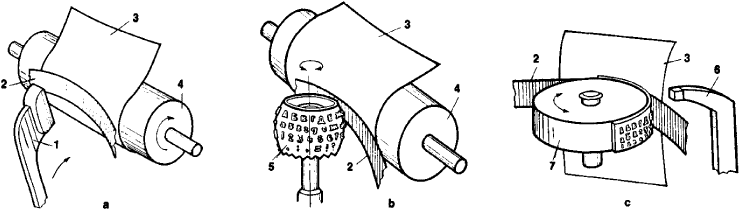
spherical head or wheel with raised typefaces (see Figure 1)— and a drive system. To print a character, the printer automatically converts the character code received from the computer into an electrical signal that sets the appropriate type bar in motion, turns the spherical printing head so that the necessary character is facing the paper, or sets the digital wheel in the position where the needed character is opposite the hammer. Mechanical printers work relatively slowly; their operating speeds are determined by the inertia of the moving elements and, depending on the design, reach 20 characters a second for character serial printers and 200–300 lines a minute for line printers. The weight of the moving elements is much less in matrix, or wire, printers, wherein the printed character is formed as a set of points that are printed by moving forward selected members of an array of wires.
In nonmechanical printers the image of the characters being printed is formed automatically either on the screen of a cathode ray tube or by optical or other special means and then transferred to paper optically or electrically. The image obtained in this way is fixed by burning through the paper (spark printing), by chemical or thermal means using photo- or heat-sensitive paper, or by applying an inking powder that settles on electrically charged sections of the paper and is fixed thermally or chemically. The speed of such printers ranges from 100 to 3,000 characters a second depending on the design and technological characteristics.
REFERENCES
Saveta, N. N. Ustroistva vvoda i vyvoda informatsii universal’nykh elektronnykh tsifrovykh vychislitel’ nykh mashin. Moscow, 1971.Alferov, A. V., I. S. Reznik, and V. G. Shorin. Orgatekhnika. Moscow, 1973.
M. G. GAAZE-RAPOPORT