Capsule VN Engine - a visual novel engine
A downloadable tool for Windows
🚀 CAPSULE VN ENGINE v1.9.0
The Most Powerful No-Code Visual Novel & Narrative Game Engine
Stop building static visual novels.
Start building real games — without writing a single line of code.
Capsule VN Engine is a full no-code narrative game engine that lets you create branching stories, RPG systems, exploration gameplay, and even turn-based combat — all inside a structured visual editor.
No scripting.
No programming.
No engine complexity.
Just build.
🔥 Why Capsule Is Different
Most VN tools give you dialogue.
Capsule gives you game systems.
- 🎒 Inventory systems (stackable, consumable, conditional)
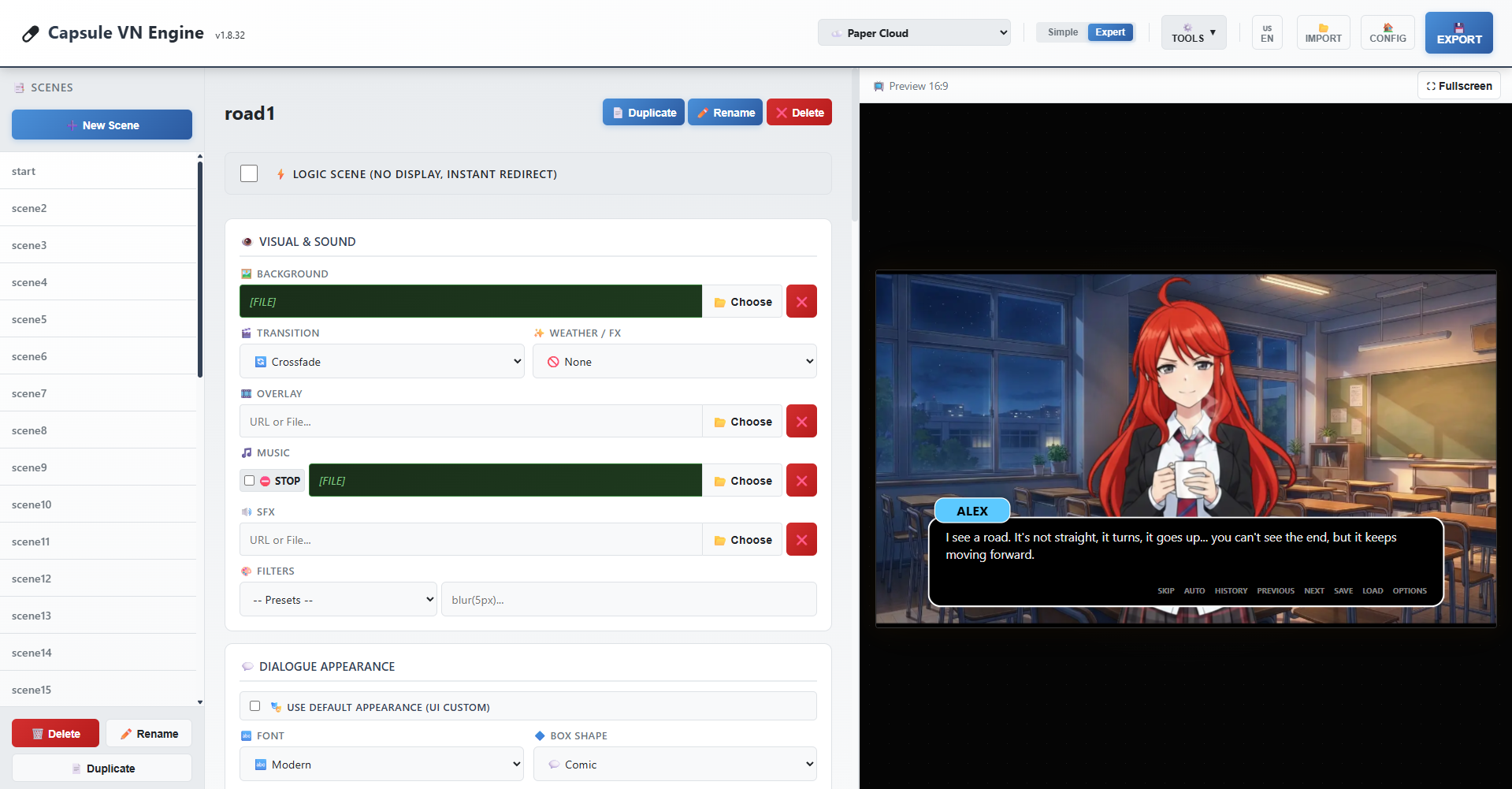
- 🗺 Point-and-click exploration
- ⏱ Timed QTE choices
- 🖼 Unlockable CG gallery
- ⌨ Text input & puzzle codes
- ⚔ Turn-based combat mechanics
- 📜 Quest systems & objectives
- 📊 Visual story timeline (branch map)
- 🔢 Advanced variables & conditional logic
- 🛠 Built-in Project Health validation
This is not “just” a visual novel engine.
This is a narrative game framework.
🎮 Build Any Narrative Game You Imagine
Capsule is perfect for:
- Creating a dating sim where relationships evolve through choices and stats
- Designing mystery investigations with clues, inventory, and deductions
- Building narrative RPGs with quests, combat, and character progression
- Making exploration-based story adventures with interactive locations
- Creating escape games using puzzles, codes, and story logic
From simple branching stories to complex stat-based combat systems — Capsule scales with you.
💡 100% No-Code — But Not Limited
You get the power of game logic without touching code:
- Variables & flags
- Conditional branching
- Stat systems
- Dice / RNG mechanics
- Multi-step quests
- Trigger systems
- Modular action blocks
Everything is visual. Everything is structured.
You focus on creativity. Capsule handles the logic.
🧠 Built for Serious Projects
Version 1.9.0 is the most complete and stable release yet:
- Deep internal refactors
- Security hardening
- Performance improvements
- Save versioning & migration
- Validation against broken scenes or logic
Capsule is built to grow with long projects — not just prototypes.
📱 Publish Anywhere — Android in 1 Click
Export your game instantly to HTML.
Use Capsule HTML2APK to convert your project into an Android APK in one click.
No complex setup.
No external build pipeline.
No technical nightmare.
Create → Export → Publish.
🎯 Who Is Capsule For?
- Indie developers
- Solo creators
- Writers who want gameplay
- RPG designers without coding skills
- Game dev beginners who want professional tools
If you want power without programming — Capsule was built for you.
🧩 Current Version: 1.9.0
The Most Advanced Capsule Release Ever
✅ More flexibility.
✅ More control.
✅ More possibilities.
Stop limiting your stories.
Build the game they deserve.
Download
Click download now to get access to the following files:
Development log
- 🚀 Capsule VN Engine 2.0 — Official Development Roadmap12 days ago
- 🚀 Capsule VN Engine v1.9.0 — Cinematics & CapsuleScript Update14 days ago
- 🚀 Capsule VN Engine 1.8.32 – The Biggest Evolution Yet18 days ago
- 🚀 Launch Day: Transform Your Stories into Android Apps!22 days ago
- 🚀 RELEASE: Capsule VN Engine 1.6.2 – A fully-featured narrative engine!29 days ago
- ⚡ Devlog v1.2.7 (Actor Studio): Text FX Engine, Actors & Core Optimization36 days ago
- 🚀 Capsule VN Engine v1.2.2: The "Cinematic FX" Update37 days ago
- The Festival's Spark - A Capsule's POC40 days ago

Comments
Log in with itch.io to leave a comment.
been keeping my eye on this for a while and i will say im impressed with what it is so far.
now i do have a question that might be dumb, but i haven't figure it out yet: how do you make character switch sprites between dialogs in an Scene? or make then appear and disappear in that same scene?
Hello izrax, thanks a lot, im glad you like Capsule !!
Actually the expression/sprite stays the same throughout the scene. To switch sprites between dialogues, you currently need to split into multiple scenes that chain together with "Auto Next Scene". Each scene can have a different
charactersconfiguration (different expression, position, or even remove a character entirely). Since transitions can be set tonone, this feels seamless to the player.However, that's a relevant idea, so I think I'll add the option to include a BBCode [expr:actorId:expression] in the dialogue to allow changing the expression within the same scene. This would help reduce the number of scenes. Excellent idea!
So in 2.0, in the same scene you will be able to make something like :
[expr:alice:happy]I found the key !
[expr:alice:sad]But at what price...
[expr:alice:angry]I will never forgive !
ooh i see. yeah this seemed counter intuitive cause a scene most time should hold all the actions . plus that would make the visual timeline less cluttered and efficient .
may i suggest you also add the ability to change characters, music/sfx , and background too.
I just made a significant monetary donation to this, even though I haven't even downloaded the tool yet, on principle alone. This is an extremely exciting and promising project for non-programmer VN design and development. In fact, based on its current trajectory, I could seriously envision this being a major disruptor in the whole VN dev landscape ... possibly even displacing Ren'Py as the new "point of entry" for beginning VN devs.
For context, I'm currently developing my first game ... an adult RPG / eroge VN / fantasy dating sim / magic card battle hybrid ... in Unity with Naninovel. While I wouldn't expect Capsule to be able to handle Unity-like things such as particle systems or post-processing effects (at least not in the near future), I can already imagine recreating my entire project in this engine.
Again, totally sight unseen at this point (so maybe this will be apparent once I start playing in it), but some key features that I would need to fully embrace Capsule include:
These are just my initial thoughts. I'd be glad to help beta-test new updates to the engine, as I'm very much in the not-traditional-VN game development camp. Keep up the amazing work!
Thank you so much for the incredible support and the generous donation! Reading your enthusiasm completely made my day. Your adult RPG / dating sim / card battle hybrid sounds like an epic adventure, and it’s exactly the kind of ambitious project I’d love to see brought to life in Capsule! I must admit I've played a considerable number of hybrid visual novels for adults. The card game style (for battles, for example, or for creating conditioning builds) is a fairly niche type of game, and it's not the easiest to make. I wish you the best in your game creation!
Naninovel is an excellent choice for those who are proficient in Unity. Capsule doesn't have Unity's technical power and never will, remaining a monolithic engine. And besides, I'm not trying to compete with engines like Naninovel, which is based on Unity, or DiaLogic, which is based on Godot; they're not targeting the same audience at all. Capsule isn't limited to games; it can be used for interactive lessons, presentations, and more.
As a narrative/RPG engine, Capsule already surpasses well-established engines like TyranoBuilder, Visual Novel Maker, Twine, Narrat, and others. Ren'py remains technically more powerful with its Python code, which unlocks almost unlimited capabilities, but it doesn't measure up in terms of portability, ease of use, security, project management, native features, and even longevity (since an HTML game created with Capsule will still work in 2050). Not to mention that the CapsuleScript DSL is currently the only one that allows for the automated creation of game architectures via simple LLMs.
And this is just version 1.9.0; version 2.0 will add an incredible array of features while increasing stability and power, always keeping in mind the need to make game creation accessible to both beginners and professionals.
You'll be happy to know that several of the features you listed are already in your inventory:
Regarding your audio requests: currently, the engine operates on two primary audio tracks (Music and SFX) with their own volume sliders in the options, alongside the TTS features (in V2, not released yet). Expanding this into a dedicated 4-channel mixer (BGM, Looping Ambient, Voice, and One-off SFX) with independent on-the-fly volume sliders is a fantastic idea. I am definitely adding this to the roadmap to fully support proper voice-acted VNs!
I would absolutely love to have you onboard as a beta-tester! Feedback from developers pushing the boundaries of traditional visual novels is exactly what I need to make Capsule a true game-changer. Let's keep in touch!
Hello again! Can't import a previously exported project, even a default one. Can you fix this and add a logging system for debug purposes?
I can save project and then import. But in default save file i cant find a way to set up resoluton to 1080x2400
Hi Corvi, thanks for your feedback, i hope you have fun with the engine !
The exported projects all have an obfuscated section, a built-in anti-cheat system.
This makes the file incompatible with any attempt at a complete translation and therefore with importing it into the engine. I wouldn't be able to translate one of these files myself. That's why you absolutely must use the save function. Exporting is only for publishing the game.
For debugging, you already have logic preview, project health, and development mode. No other engine offers this natively.
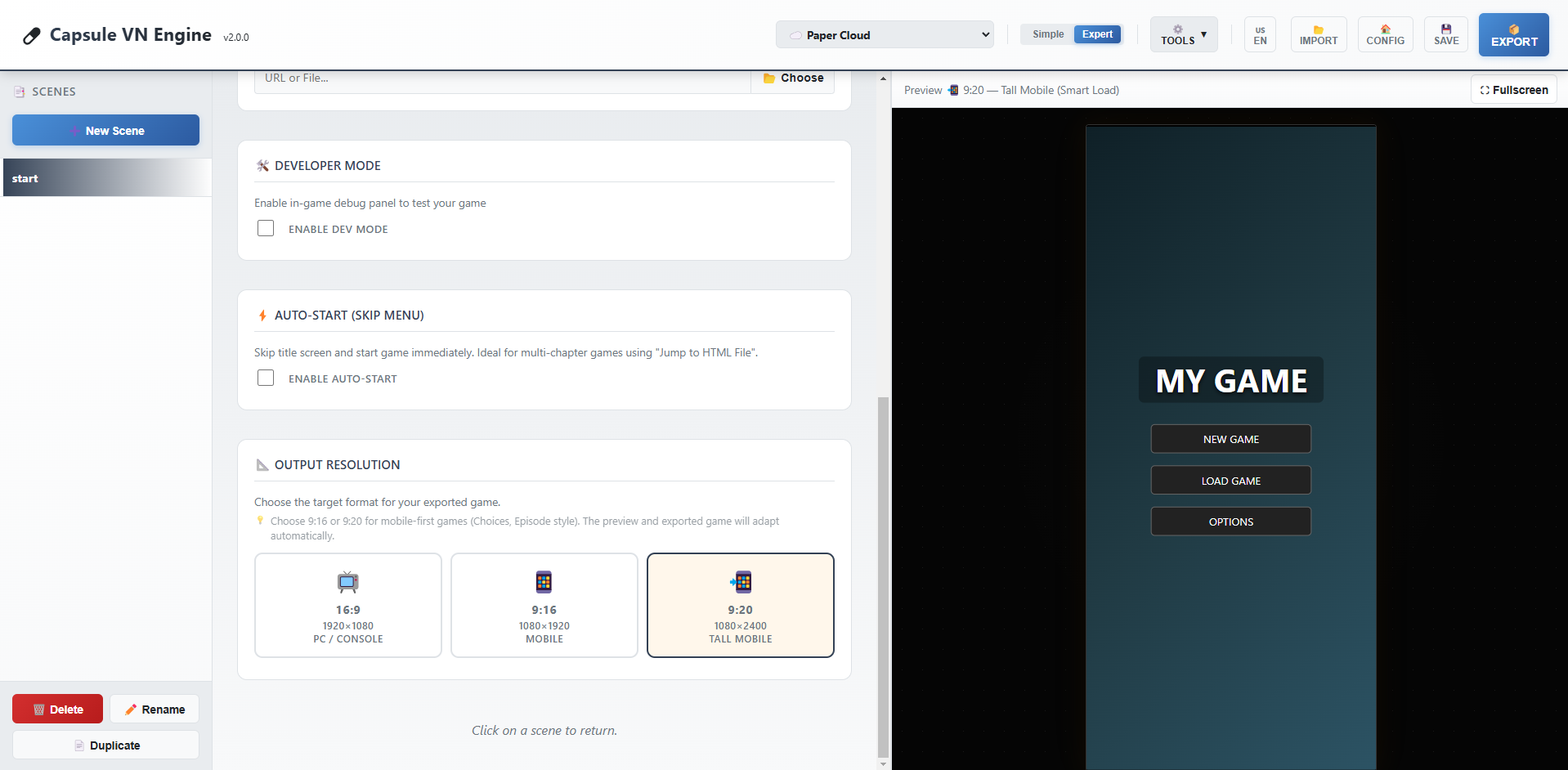
V2 with include a resolution function to go from 16:9 to 9:16 and even 9:20.
Until then you have to find this in the exported game :
#game-viewport { position: absolute; width: 1920px; height: 1080px;
And replace it by :
#game-viewport { position: absolute; width: 1080px; height: 2400px;
Yes, unfortunately Capsule 1.9.0 is not yet optimized for this type of format, so it won't necessarily be very intuitive.
Hello from Ukraine! How can I use this engine to create a vertical NVL novel in 9:20 format? Like this: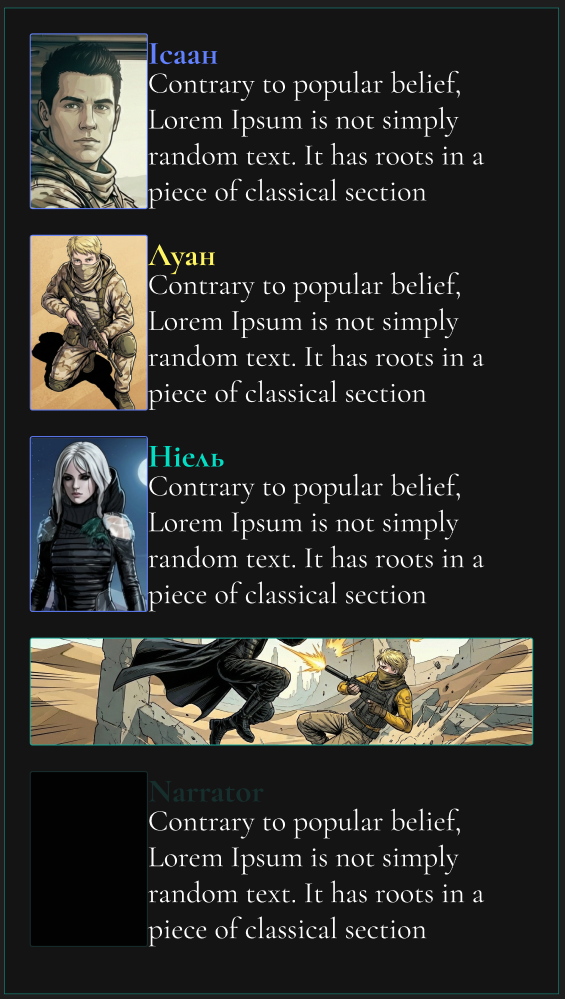
Hello from France! 🌸 Thank you so much for trying out Capsule VN Engine, it's awesome to see it reach creators in Ukraine!
Currently, the engine defaults to the classic visual novel landscape format (16:9, 1920x1080). However, since Capsule exports everything into a single, clean HTML file, you can easily "hack" it to fit a 9:20 vertical smartphone format!
Here is the quick ninja way to do it:
1. Tweak the Engine's CSS Once you export your game, open the
.htmlfile with any text editor (like Notepad or VS Code). Look near the top for the<style>tags. Find the#game-viewportrule and change the resolution:width:1920px; height:1080px;width:1080px; height:2400px;(This gives you a perfect 9:20 ratio!)2. Adjust the UI Because the screen is now narrower, you might want to find the
#dialog-boxin the CSS and adjust itswidthandbottommargins so the text box fits perfectly on a vertical screen like a modern Otome game. 📱3. Use Portrait Backgrounds Simply upload vertical backgrounds (1080x2400) directly into the engine while building your story. They will look stretched in the editor, but will display perfectly in your final modified HTML file!
I am definitely taking notes and planning to add a native "Vertical Mode" switch inside the editor for a future update. I would love to see the vertical novel you create with it! ✨
Hello CapsuleTeam,
I see there are a lots of new features in 1.8.32, can we expect a faq or manual, it would really help.
Thanks.
Hello!
Thank you so much for your interest and for reaching out. You are absolutely right—version 1.8.32 introduced a lot of powerful mechanics (like the inventory, QTEs, and advanced logic) to help creators build rich, anime-style visual novels, and proper documentation is the next logical step!
Right now, I am looking into the best way to provide this. I am planning to create a comprehensive guide to cover all the features.
In the meantime, don't hesitate to rely on the tooltips available inside the editor (especially in Expert Mode), and feel free to ask any specific questions you might have right here in the comments. I'd be more than happy to help you figure out a specific feature!
Happy creating! 🚀
Gave this a download on the off-chance it would work for my horror puzzle vn, and I'm really impressed so far! There's stuff it obviously needs, I couldn't find interactive areas for example (that could just be me though), but I'm surprised at how much is already here. I like the options for character movement - I'm thinking I'll make the front menu as a scene and that will let me animate the salt ring if I set it as a character.
Honestly, this was a really pleasant surprise!
Would like to be able to remove the main menu and use a scene for it instead, and be able to shut off the dialogue box per scene, as well as interactive areas, but honestly - for such a new engine it's super promising.
Wow, thank you so much for your feedback! 🌟 It's great to see that you're planning to create a horror and puzzle game with Capsule.
You're currently using version 1.6.2, but I have some excellent news: almost everything you mentioned is already implemented in the upcoming v1.8.0 update (and that's just a small part of all the new features coming in version 1.8.0)!
Interactive Zones: The new version introduces a complete point-and-click system (interactive zones) with customizable cursors (magnifying glass, hand, etc.). You'll be able to create real puzzle scenes.
Customizable Main Menu: It's already possible to bypass the main menu in version 1.6.2; just go to GUI and check the Enable Auto-Start box.
Hiding dialogues: This is already possible. When editing a scene, simply leave the name and dialogue fields empty to make the dialogue window disappear.
Animated salt ring: This won't be available in version 1.8.0 (although effects can already be applied to character appearances), but it's already functional in version 1.9.0, which I'm currently working on. This upcoming update will support sprite sheets, allowing you to easily create looping animations for any character (or object).
I'm working hard to refine Capsule VN Engine. Stay tuned, version 1.8.0 should revolutionize your project! 🚀
That's fantastic! You work really fast :D
I try... I try ;)
Hi CapsuleTeam, thanks for your app, it's easy to use. I plan to use it for a school project, is it possible to have some effects like rain or snow?
Hello TheDivide,
Thanks for your feedback, i wish you the best with your project.
Concerning the effects, I'm working hard on it, you've given me a real challenge! But i think it should be done in the next version.
Nice, im waiting for this 😊
Another short test
https://goliard.itch.io/another-capsule-vn-test
...and some observations:
But yeah, it's simple and straight forward, so kudos so far!
goliard
Hello goliard,
I'm glad you manage to use it well. You should take a look to the last update, it will make your experience better. About your observations :
- You can delete a scene, just select a scene and click on the red button called "delete", next to "duplicate" and "rename".
- It's a good point, i will think about it.
- You can have many character appearance in the last update:
- It's fixed in the last version, i managed to make a test with more than 50 scenes without any bug.
Thanks again for your feedback, it helps a lot !
Hi
How come I didn't notice that DELETE button? Weird.
Great to see things are moving fast! I'll play with it again in a little while
g
I'm glad to tell you that next version will include a "splash screen" function. Coming soon :)
Brilliant! Keep it coming!!
Hello, dear developer.!When I first met, I expressed my expectation for this software.✧*。٩(ˊᗜˋ*)و✧*。I hope this editor can support it in the future.The language of Chinese.(I, a China player, expressed my expectation.)course, I am also looking forward to one-stop export to apk.Thank you for your continuous development and update!
(ps:Is the character in the editor icon the official oc?The painting style of the character looks cute and kind.(This is just a little abrupt problem, so don't worry about it.))
Hello my friend,
Thanks for your feedback. Sure, i will add chinese and japanese in the future.
Yes, this character will probably be our muse for the rest of Capsule's life :)
Hello CapsuleTeam!(✧∇✧)!
Thank you so much for your warm and prompt reply! It's great to hear that Chinese language support is on the roadmap - I'm really looking forward to it!
I've tried the engine and I'm impressed by its potential! The support for variables and branching is a solid foundation for storytelling.
To help me plan my project better, I have a couple of questions about the future direction:
Are there any plans to make the exported HTML project more optimized for packaging into standalone applications (like APKs for mobile)?
Could you tell me a bit more about the two characters (the green-haired one and the red-haired girl who loves painting)? They both have such unique and charming designs! Are they the official OCs of the team? They really spark imagination!One day, after I practice my painting skills, I want to draw free illustrations for them.
Wishing you the best with the development! I'll be cheering for you from the sidelines.
Best regards!♥(。→v←。)♥
Hello! (✧ω✧)
Thank you so much for your energy and kind words! It really motivates me. I am indeed working hard to make Chinese support a reality soon.
Regarding your questions:
1. Mobile Packaging (APK): Actually, Capsule VN Engine is inherently optimized for this! Because it exports a Single HTML File with zero external dependencies (no folders, no loose assets), it is incredibly easy to wrap into an APK. You can use tools like Capacitor, Cordova, or even simple "Website to APK" converters. You just feed them your game's HTML file, and since all data is embedded inside, it works offline on mobile immediately without any path/loading issues. We plan to write a tutorial on this in the future!
2. The Characters: I am so happy you like them! Yes, they are the official mascots of the engine.
I would be absolutely honored to see your illustrations of them! Please do share them if you draw them one day!
Thank you again ♥
Feature Suggestion: Enhancing Input Box for Richer Branching Narratives
Hi!CapsuleTeam!ദ്ദിᵔ.˛.ᵔ₎✧
Thank you so much for your detailed and encouraging reply! It means a lot to me as someone who is passionate about creating interactive stories and truly believes in the potential of CapsuleVN Engine.
I'm particularly excited about the official mascots, Aiko and Laetitia. They perfectly represent the two sides of creation - logic and art. I'm currently learning drawing skills, and it's my goal to create illustrations for them once I feel confident in my abilities. I would be honored to contribute as an early supporter!
♡(*´∀`*)人(*´∀`*)♡
Based on my experience with other visual novel engines, I have a feature idea that I believe could greatly empower creators to build more immersive and branching narratives.
Thank you for your detailed and encouraging reply regarding the APK export and the official characters! I'm very excited about the future of the Capsule engine.
I'm an indie creator passionate about narrative-driven games. While exploring tools, I often imagine scenarios where players advance the plot by typing specific words or phrases rather than just selecting from multiple choices. For example:
In a puzzle segment, entering a secret code (like "moonlight" or "raven") to unlock a door.
The story branches based on a key response the player types.
I understand that complex Natural Language Processing might be challenging to implement. Therefore, I'd like to suggest a potentially more feasible feature: a customizable "Keyword Input & Judgment" component.
The ideal functionality might include:
Preset Keywords: Creators can pre-set several keywords or phrases they expect players to input (e.g., setting keyword "trust" to trigger branch A, and "silence" for branch B).
Fuzzy Matching: The system could recognize if the player's input contains these keywords, without requiring exact match, improving user experience and error tolerance.
Conditional Jump: Upon a successful match, the game could jump to a designated storyline or scene, similar to handling conditional branches.
This functionality would unlock new possibilities for genres like mystery, puzzle, and high-freedom RPGs, moving interactions beyond multiple-choice questions towards "open dialogue" or "password-based" immersion.
I've previously used an engine called Kocho (which has a blue butterfly as its icon) for simple prototypes. Its interface was quite intuitive for basic input handling. Perhaps some interaction logic from it could offer a reference point for usability design, even though Kocho is no longer updated.
Implementing such a feature would be a groundbreaking "killer feature" for creators focusing on deeply interactive stories. Thank you again for creating such a promising tool and listening to community feedback! I look forward to witnessing the growth of the Capsule engine.
Best regards!つ♡⊂
——❤️🌹CH白棣
Hello again CH白棣! (つ✧ω✧)つ
Thank you so much for this incredibly detailed feedback! I really appreciate you taking the time to explain the logic and even citing Kocho as a reference (I remember this engine, it had some great ideas!).
I have great news for you: You are perfectly in sync with my roadmap.
i was just analyzing the roadmap for the next major updates, and a "Text Input / Keyword System" is actually in our priorities! Your suggestion confirms that this is exactly what creators need right now to unlock the Mystery/Puzzle genre.
I will definitely implement the logic you described:
player_answer).Consider it done! This feature will be integrated into the upcoming v1.8 update (because the 1.7 is already done but not released yet).
Thank you for helping us shape the future of Capsule. Your feedback is invaluable! ❤️
Best regards, Capsule Team
Seems fine, mechanics look good, but can't change the language to English...
Hi,
Thanks for your feedback. If you're referring to the application itself, it's normally set to English by default. Otherwise, you need to click the button to change the language in the menu at the top right.
If you're referring to the visual novel preview on the right, it's possible that the preview was displayed in French.
In that case, click on "Config." This will display the visual novel's start screen. There, click on "Options" in the preview screen and select English. This should fix the problem and save your preference locally in your browser. So, every time you log back in, it will be in English.
Let me know if this resolved the issue.
Thanks!
I tried all that. It didn't work.
Hi Goliard,
Can you add a screenshot please? I just tried with Edge, Opera and Chrome and it's working.
EDIT: I've been working on a new multilingual model; now the application appears in English by default, both the application itself and the preview. This should have resolved your issue.
To add other languages, you need to click the "CONFIG" button. If you change the interface language and have added the language via "CONFIG", the preview will change dynamically.
Now it works fine! I really like the UX -- very friendly and intuitive. Hope to use it for a project soon.
Thanks for your feedback, I'm glad you like the app. The next step is to allow users to edit scene names and also move them around, in case they accidentally switch scenes.
I think the update will be live soon (probably today).
I'll be launching a Jam soon to invite developers to test the app, and I hope you'll be among the participants :)