
DitherMaster
A downloadable tool for Windows
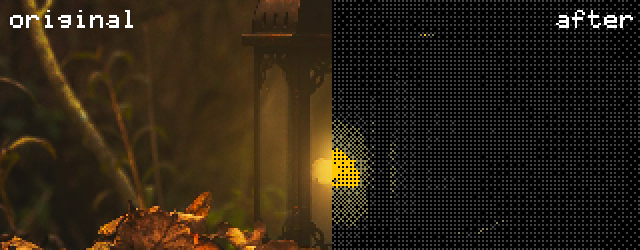
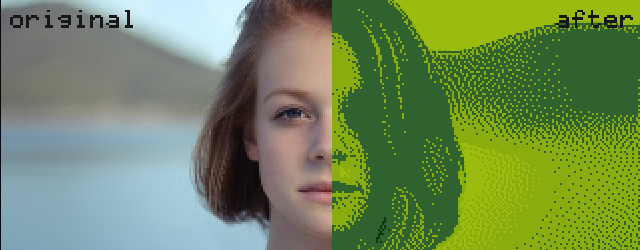
DitherMaster is a lightweight, standalone dithering application for creating retro graphics. Transform your images with various algorithms!
— Features
- 22+ Dithering Algorithms - From classic to experimental
- 10 Built-in Color Palettes - Retro gaming palettes (C64, Game Boy, NES, CGA) and modern aesthetics
- .HEX Color Palettes Support - Use custom color palettes from places like LOSPEC
- LOSPEC Palette Integration - Directly fetch and use palettes from LOSPEC by slug or URL
- Custom Palette Extraction - Extract colors from your images using k-means clustering
- Multi-Color Tonal Mapping - Create duotone and tritone effects
- Image Pre-Processing - Brightness, Contrast
- CRT Effects - Simulate CRT subpixel rendering, phosphor glow and warp
- Glitch Effects - Pixel sort, scanline glitch, RGB shift, color crush and noise
- Scale Control - Adjustable resolution
- Manual Zoom - Pixel-perfect scaling (1-10x)
- Real-Time Preview - See changes instantly as you adjust settings
- ...
— Supported Algorithms
Error Diffusion:
- Floyd-Steinberg - Industry standard, smooth gradients
- Atkinson - High contrast, chunky aesthetic (classic Mac look)
- Jarvis-Judice-Ninke - Stippled, organic appearance
- Sierra - Stochastic, natural-looking distribution
Ordered Dithering:
- Bayer 2×2 - Simple checkerboard pattern
- Bayer 4×4 - Medium detail crosshatch
- Bayer 8×8 - Complex star pattern, finest detail
Halftone:
- Circular Halftone - Print-style dots
Modulation:
- Vertial Scanlines - CRT-like scanlines (retro monitor effect)
- Horizontal Scanlines - CRT-like scanlines (retro monitor effect)
- Dispersed Modulation - Angular diffusion with multi-directional waves
- Circuit Modulation - Circuit board aesthetic with grid pattern
- Tilt Modulation - Diagonal hatching at 45°
Pattern Dithering:
- Random Noise - Classic white noise threshold
- Clustered Dot - Structured dot pattern
- Matrix - Sci-fi cyber look with vertical streaking
- Knit - Diagonal weave pattern (textile aesthetic)
- Cross - Plus-sign shaped patterns
- Square - Block-based mosaic
- Serpentine - Wavy S-curve patterns
- Star - Radiating starburst effect
- Grid - Graph paper style cells
- Stitch - Embroidery-inspired alternating pattern
- Clock - Concentric circles with radial divisions
- Cyber - Futuristic digital glitch with angular breaks
— Included Color Palettes
- Black & White - Classic monochrome
- Commodore 64 - 16-color retro computing palette
- Game Boy - 4 shades of green
- NES - Nintendo Entertainment System colors
- CGA - IBM CGA Palette 1
- Pastel - Soft, modern aesthetic
- Vibrant - Bold rainbow colors
- Earth Tones - Natural browns and tans
- Cyberpunk - Neon magenta and cyan
- Vaporwave - Purple, pink, and cyan aesthetic
- Sunset - Warm gradient palette
— Examples

— Community
Join the Discord to get support or share your work!
— System Requirements
A up-to-date Windows 11 version is recommended.
Note: Windows will most-likely show a red warning screen when starting the program. You have to
press "More Info" and then "Run Anyway".
Purchase
In order to download this tool you must purchase it at or above the minimum price of $8 USD. You will get access to the following files:
Development log
- v1.0.0: Background Remover, QoL63 days ago
- v0.7.0: Color Replacements & Algorithm Intensity76 days ago
- v0.6.0: Hue Shift78 days ago
- v0.5.3: Small Hotfix83 days ago
- v0.5.1: Color Matching & Custom Pallete83 days ago


Comments
Log in with itch.io to leave a comment.
I picked this up from a post in the Vermis subreddit and have been using it for a bit here. Some feedback (not that you asked for it):
Things I like:
Things I think could be improved:
Questions:
Thanks a lot for the feedback! I will try and fix some of the stuff you mentioned in the near future
Regarding the questions:
I hope that answers your questions :) In case you ever release something where DitherMaster helped I would love to see it, so feel free to post about it here in the comments!
We have adopted this as the official dither of Neon Dystopia. Thank you for such a wonderful tool! https://www.neondystopia.com/
That’s awesome!! :)
Hey, any chance we can get this ported to a Mac OS version? Thanks!
Just made a account to say that this program is awesome loving it! I have a question for the future, i am working with many pngs but when i use the program it creates a black backround which i have to clip out with a mask, will there be a option to get a transperant backround in the future?
Best regards and stay strong
Happy that you find it useful and thanks for the feedback!
I will add a way to make the background transparent in the next update :)
goat
Hi! I just bought this tool, it's amazing! I was wondering if you could share the rest of the settings for the example you posted on Reddit (in the Vermis subreddit) with the armor and skull. I'll understand the tool more i think if i can copy that style and then work from there. Would that be possible? Thank you very much!
I quickly re-created it. The settings should be similar to this:
I hope that helps :)
It did, thanks!
Yes, wow! I got the right CGA palette from LOSPEC in less than a minute, and it works perfect.
Just purchased! I am particularly interested in the CGA palette options. I will be using this and I will let you know how it goes.
Thanks a lot! If something isn’t working as expected or you have any ideas for improvement let me know :)
I have been using Gimp - Index color - to generate GGA palette, dithered images. Sometimes that works great right out of the box, but often times I have to do a lot of manual changes. Your software is great because I can make all those adjustments - like brightness and contrast in particular - and see the results in real time.
I still have to do some manual fixes afterwards, but it is so minor in comparison that I don't know if it's worth mentioning.
I plan on playing around with the custom palette option, since I am using CGA mode 5, which uses red instead of magenta. I will let you know how that works out.
In general, it's a nice tool that I think I will be using a lot. At least on my current project.
I’m glad that it’s useful for you! Thanks for giving the tool a go :)
I used a similar workflow with Photoshop and Index Color and had the same problems. It was just too many steps and extra tuning needed for most images. That’s why I wanted a tool fully focused on this task where I can quickly experiment.